Automate Site Audits: Headless Chrome to BigQuery
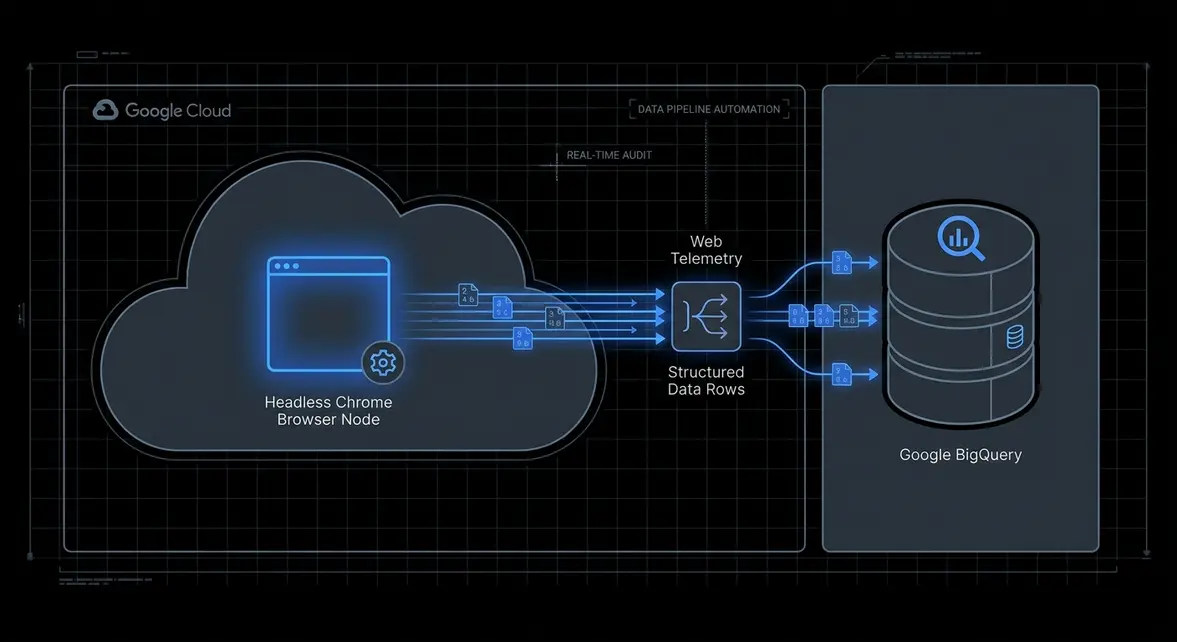
Automated URL Scraping Pipeline to BigQuery via Headless Chromium
Executive Architectural Takeaway: Legacy desktop-bound SEO crawlers create severe operational friction in enterprise environments due to unscalable compute bounds, licensing seats, and manual CSV handling. Decoupling the crawler runtime onto Google Compute Engine or serverless containers via headless Chromium and streaming telemetry directly into Google BigQuery establishes a persistent, programmatic data pipeline. This setup surfaces metadata drift, canonical violations, and dead status codes before they damage organic search equity.
Traditional technical SEO auditing workflows rely on ad-hoc desktop software or rigid third-party SaaS tools that fail to integrate cleanly with continuous deployment (CI/CD) pipelines. When engineering teams deploy programmatic routing updates, single-page application (SPA) shell changes, or database-driven URL rewrites, the lag between deployment and manual audit detection often exceeds weeks. By treating technical SEO audits as automated integration tests running on cloud infrastructure, teams eliminate discovery delays entirely.
Running headless Chromium inside a cloud environment provides full DOM rendering parity with modern search engine bots like Googlebot. It captures client-rendered HTML states, executes asynchronous hydration routines, and evaluates redirect networks that static HTTP requests completely miss. Streaming this data downstream into BigQuery converts fragmented audit snapshots into an append-only analytical warehouse ready for automated anomaly detection and dashboard ingestion.
Technical SEO Infrastructure: Runtime DOM Extraction vs. Static Scraping
Modern web architectures built on frameworks like Next.js, Nuxt, and Remix introduce client-side state hydration that breaks basic HTTP GET crawlers. Static crawlers inspect the initial server response, which frequently contains empty placeholder divs and unpopulated title tags when client-side rendering is misconfigured. Using a headless Chromium runtime ensures that the audit evaluates the exact rendered DOM exposed to web crawlers after JavaScript execution completes.
Streaming crawl results directly into BigQuery transforms site telemetry into an addressable data warehouse where SEO engineers can run high-throughput SQL diagnostics. By partitioning tables by crawl_timestamp and clustering by status_code and url_domain, teams can compute daily structural deltas: identifying newly introduced orphan pages, unindexed deep nodes, and circular redirect chains across multi-million URL estates without scanning redundant historical partitions.
This continuous data capture specifically guards against common programmatic indexing vulnerabilities:
- Silent Soft 404s: Dynamic client routes that return a visual error page while serving an HTTP
200 OKstatus header. - Canonical Drift: Discrepancies between server-injected canonical response headers and client-hydrated
<link rel="canonical">tags. - Internal Link Decay: Deep programmatic loops where dynamic faceted navigation creates infinite crawling traps, consuming crawl budget.
- Metadata Parity Failures: Empty or placeholder
document.titleand<meta name="description">strings caused by hydration timeouts or failed API calls.
Production Engineering Runbook: Containerized Crawler & BigQuery Ingestion
Deploying an automated crawler requires two technical primitives: an optimized, partitioned BigQuery destination schema and an asynchronous Node.js crawling process running Headless Chromium that batches row streaming via the @google-cloud/bigquery API.
First, define the BigQuery destination table using ingestion-time partitioning and clustering for fast delta querying:
CREATE TABLE `project_id.seo_telemetry.crawl_results` (
  crawl_timestamp TIMESTAMP,
  url STRING,
  status_code INT64,
  page_title STRING,
  meta_description STRING,
  canonical_url STRING,
  internal_outlinks ARRAY<STRING>,
  external_outlinks ARRAY<STRING>,
  load_duration_ms INT64
)
PARTITION BY DATE(crawl_timestamp)
CLUSTER BY status_code, url;
Next, implement the Node.js crawling pipeline. This script initializes Puppeteer, traverses targeted internal routes recursively, extracts DOM metadata, and streams records to BigQuery using the streaming insert API:
const puppeteer = require('puppeteer');
const { BigQuery } = require('@google-cloud/bigquery');

const bigquery = new BigQuery();
const DATASET_ID = 'seo_telemetry';
const TABLE_ID = 'crawl_results';

async function crawlAndStream(seedUrl, maxPages = 100) {
  const browser = await puppeteer.launch({
    headless: 'new',
    args: ['--no-sandbox', '--disable-setuid-sandbox']
  });

  const visited = new Set();
  const queue = [seedUrl];
  const domain = new URL(seedUrl).hostname;

  while (queue.length > 0 && visited.size < maxPages) {
    const currentUrl = queue.shift();
    if (visited.has(currentUrl)) continue;
    visited.add(currentUrl);

    const page = await browser.newPage();
    const startTime = Date.now();

    try {
      const response = await page.goto(currentUrl, { waitUntil: 'domcontentloaded', timeout: 30000 });
      const duration = Date.now() - startTime;
      const statusCode = response ? response.status() : 0;

      const pageData = await page.evaluate((currDomain) => {
        const title = document.querySelector('title') ? document.querySelector('title').innerText : '';
        const metaDesc = document.querySelector('meta[name="description"]')
          ? document.querySelector('meta[name="description"]').getAttribute('content') : '';
        const canonical = document.querySelector('link[rel="canonical"]')
          ? document.querySelector('link[rel="canonical"]').getAttribute('href') : '';

        const anchors = Array.from(document.querySelectorAll('a[href]'));
        const internal = [];
        const external = [];

        anchors.forEach(a => {
          try {
            const parsed = new URL(a.href);
            if (parsed.hostname === currDomain) {
              internal.push(parsed.origin + parsed.pathname);
            } else if (parsed.protocol.startsWith('http')) {
              external.push(a.href);
            }
          } catch (e) {}
        });

        return {
          title,
          metaDesc,
          canonical,
          internalOutlinks: [...new Set(internal)],
          externalOutlinks: [...new Set(external)]
        };
      }, domain);

      const row = {
        crawl_timestamp: new Date().toISOString(),
        url: currentUrl,
        status_code: statusCode,
        page_title: pageData.title,
        meta_description: pageData.metaDesc,
        canonical_url: pageData.canonical,
        internal_outlinks: pageData.internalOutlinks,
        external_outlinks: pageData.externalOutlinks,
        load_duration_ms: duration
      };

      await bigquery.dataset(DATASET_ID).table(TABLE_ID).insert([row]);

      for (const nextLink of pageData.internalOutlinks) {
        if (!visited.has(nextLink) && !queue.includes(nextLink)) {
          queue.push(nextLink);
        }
      }
    } catch (err) {
      console.error(`Execution failure on ${currentUrl}:`, err.message);
    } finally {
      await page.close();
    }
  }

  await browser.close();
}

crawlAndStream('https://example.com', 500);
B2B Enterprise Growth Acceleration & Margin Optimization
For high-growth B2B organizations running programmatic acquisition surfaces—such as integration catalogs, programmatic glossaries, or multi-tenant customer directories—data hygiene directly governs acquisition economics. If a bad release breaks routing for 15,000 product directory pages, search engines rapidly deindex stale content, driving organic customer acquisition costs (CAC) up as teams over-index on paid fallback channels.
Migrating technical auditing to an owned cloud data pipeline drives two immediate business advantages. First, it cuts enterprise crawler SaaS licensing costs by up to 90%, swapping expensive enterprise seats for inexpensive Compute Engine or Cloud Run compute jobs (<$5.00 per 100,000 pages). Second, it reduces indexation turnaround times by enabling immediate pull-request validation: automated crawlers can run in staging environments before code merges to main, ensuring zero broken links or missing canonical tags ever reach search bot indexes.
System Telemetry Source: Original Engineering Report
Related Growth Blueprints
All Blueprints →Need this architecture deployed in your pipeline?
Skip the synchronous sales cycle and endless discovery calls. Submit your core acquisition or conversion bottleneck for a deep-dive asynchronous growth diagnostic.