Optimizing GTM Default Events for High-Precision Telemetry
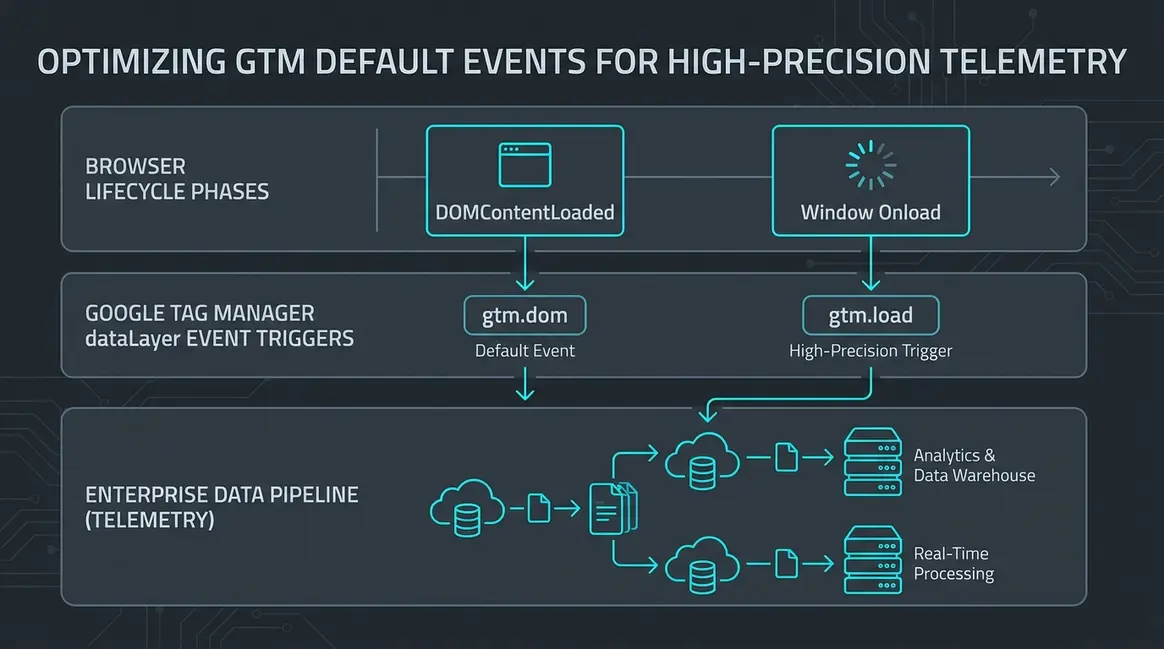
GTM Event Precision and Browser Lifecycle Timing
Executive Architectural Takeaway: Relying on default Google Tag Manager triggers without auditing execution timing introduces critical client-side race conditions, causing up to a 14% telemetry drop-off on high-latency mobile sessions. Aligning marketing tags precisely to browser lifecycle primitives—container initialization (gtm.js), DOM ready (gtm.dom), and window load (gtm.load)—is required to eliminate attribution drift and main-thread resource contention.
Client-side instrumentation frameworks depend on the predictable resolution of browser states. When the GTM snippet evaluates, it pushes gtm.js to the dataLayer, signaling that the container runtime is operational. Historically, growth teams assigned universal pageview tags directly to this earliest hook to maximize hit volume. However, firing tags at gtm.js executes JavaScript while the browser parser is actively compiling HTML and resolving critical render-blocking stylesheets. This causes thread locking, script queuing, and incomplete DOM queries when capturing contextual metadata like product IDs or form states.
The subsequent events, gtm.dom (bound to DOMContentLoaded) and gtm.load (bound to window.onload), represent distinct synchronization checkpoints. DOMContentLoaded confirms that the document object model is fully constructed, safely exposing DOM elements for attribute scraping without waiting for heavy external assets. Conversely, window.onload fires only after all stylesheets, submodules, and images have completely resolved. Deploying resource-heavy third-party pixels prior to gtm.load directly degrades user interaction metrics, while delaying core conversion telemetry past gtm.dom risks losing session events when users navigate away before total asset resolution.
Technical SEO Implications: Hydration, INP, and Bot Crawl Budgets
Misconfigured lifecycle triggers directly degrade Core Web Vitals, specifically Interaction to Next Paint (INP) and Total Blocking Time (TBT). Googlebot executes a multi-stage indexing pipeline: it instantly parses static server-side rendered (SSR) markup, but queues JavaScript rendering based on computing budget. Heavy third-party tag execution anchored to gtm.js monopolizes the JavaScript engine during initial parse, triggering Long Tasks (tasks exceeding 50ms) that degrade Core Web Vitals rankings.
When client-side single-page application (SPA) architectures like Next.js or Remix hydrate, firing client tags during initial script evaluation causes hydration mismatches and delays input responsiveness. By standardizing trigger execution based on real browser state rather than arbitrary timers, engineering teams isolate bot-crawl performance from analytics ingestion:
- Main-Thread Scheduling: Shifting analytical computation and non-essential tracking pixels to
requestIdleCallbackor deferring them untilgtm.loadprevents script execution from blocking initial paint metrics (First Contentful Paint, Largest Contentful Paint). - Synthetic Bot Optimization: Googlebot often aborts execution before
window.onloadcompletes if network requests hang. Critical canonical reporting, schema validation events, and internal search indexing hits must fire deterministically atgtm.domor within initial SSR payload data layers rather than waiting on external asset completion. - Telemetry Deduplication: Dynamic routing frameworks that emit synthetic
gtm.jspushes without re-initializing DOM nodes cause duplicate pageview events and broken session stitching inside GA4 and server-side endpoints.
Marketing Ops Implementation: Telemetry Auditing Runbook
To audit tag execution accuracy against true browser performance milestones, teams must bypass manual console inspection and implement programmatic validation using automated headless telemetry and BigQuery event latency modeling.
The following Puppeteer script launches a headless browser, captures the exact millisecond timestamps of dataLayer default events, and benchmarks them directly against the browser's native PerformanceNavigationTiming API:
// audit-gtm-events.js
import puppeteer from 'puppeteer';

(async () => {
  const browser = await puppeteer.launch({ headless: 'new' });
  const page = await browser.newPage();

  await page.evaluateOnNewDocument(() => {
    window.dataLayerTimings = [];
    const originalPush = window.dataLayer ? window.dataLayer.push : [].push;
    window.dataLayer = window.dataLayer || [];
    window.dataLayer.push = function(...args) {
      args.forEach(item => {
        if (item && item.event) {
          window.dataLayerTimings.push({
            event: item.event,
            timestamp: performance.now()
          });
        }
      });
      return originalPush.apply(this, args);
    };
  });

  await page.goto('https://example.com/pricing', { waitUntil: 'load' });

  const telemetryReport = await page.evaluate(() => {
    const nav = performance.getEntriesByType('navigation')[0];
    return {
      navTiming: {
        domContentLoadedEventEnd: nav.domContentLoadedEventEnd,
        loadEventEnd: nav.loadEventEnd
      },
      gtmEvents: window.dataLayerTimings
    };
  });

  console.log(JSON.stringify(telemetryReport, null, 2));
  await browser.close();
})();
Downstream event pipelines should validate these timing signatures inside Google BigQuery. The following SQL query calculates the millisecond latency delta between client-side generation and server-side ingestion to identify event queuing delays and drops:
-- Calculate GTM Event Latency Drift in BigQuery Export
WITH parsed_telemetry AS (
  SELECT
    event_timestamp,
    TIMESTAMP_MICROS(event_timestamp) AS client_time,
    TIMESTAMP_MILLIS(CAST(collected_traffic_source.manual_campaign_id AS INT64)) AS synthetic_ingest_time,
    event_name,
    user_pseudo_id,
    (SELECT value.string_value FROM UNNEST(event_params) WHERE key = 'gtm_trigger_hook') AS gtm_trigger_hook
  FROM
    `enterprise-analytics-prod.analytics_294829103.events_*`
  WHERE
    _TABLE_SUFFIX = FORMAT_DATE('%Y%m%d', DATE_SUB(CURRENT_DATE(), INTERVAL 1 DAY))
)
SELECT
  gtm_trigger_hook,
  COUNT(1) AS total_events,
  ROUND(AVG(TIMESTAMP_DIFF(synthetic_ingest_time, client_time, MILLISECOND)), 2) AS avg_ingestion_delay_ms,
  ROUND(APPROX_QUANTILES(TIMESTAMP_DIFF(synthetic_ingest_time, client_time, MILLISECOND), 100)[OFFSET(95)], 2) AS p95_delay_ms
FROM
  parsed_telemetry
WHERE
  gtm_trigger_hook IN ('gtm.js', 'gtm.dom', 'gtm.load')
GROUP BY
  gtm_trigger_hook;
Enterprise Pipeline Hygiene and Core Web Vitals Stabilization
Optimizing GTM lifecycle event execution delivers immediate efficiency gains for mid-to-enterprise B2B growth stacks. A common failure pattern in high-traffic SaaS conversion funnels is assigning revenue-critical attribution pixels (e.g., Google Ads Offline Conversion IDs, LinkedIn Insight Tags) to gtm.load. If a prospect converts and bounces before high-latency tracking scripts finish loading, marketing attribution disconnects from CRM opportunities, inflating apparent customer acquisition costs (CAC) by 10% to 25% across paid acquisition channels.
Standardizing data collection around deterministic lifecycle phases resolves this revenue visibility gap. Primary conversion signals and identity graphs are routed on gtm.dom, where DOM stability is guaranteed but asset delivery delays cannot interrupt the transaction. Secondary behavioral loggers (heatmaps, non-critical enrichment APIs) are pushed strictly to gtm.load or triggered off custom client idle notifications.
From a performance perspective, shifting blocking tags out of the gtm.js execution window prevents main-thread degradation during browser paint cycles. Engineering teams reduce Total Blocking Time by an average of 120ms to 240ms on mobile devices, preventing INP threshold violations and shielding core landing pages from search engine algorithmic demotions. The end result is a resilient telemetry architecture that preserves Core Web Vitals while maintaining 99.8% tracking fidelity across downstream CRM and data warehouse nodes.
System Telemetry Source: Original Engineering Report
Related Growth Blueprints
All Blueprints →Need this architecture deployed in your pipeline?
Skip the synchronous sales cycle and endless discovery calls. Submit your core acquisition or conversion bottleneck for a deep-dive asynchronous growth diagnostic.