Deploy Server-Side GTM on Cloud Run for Lower OpEx
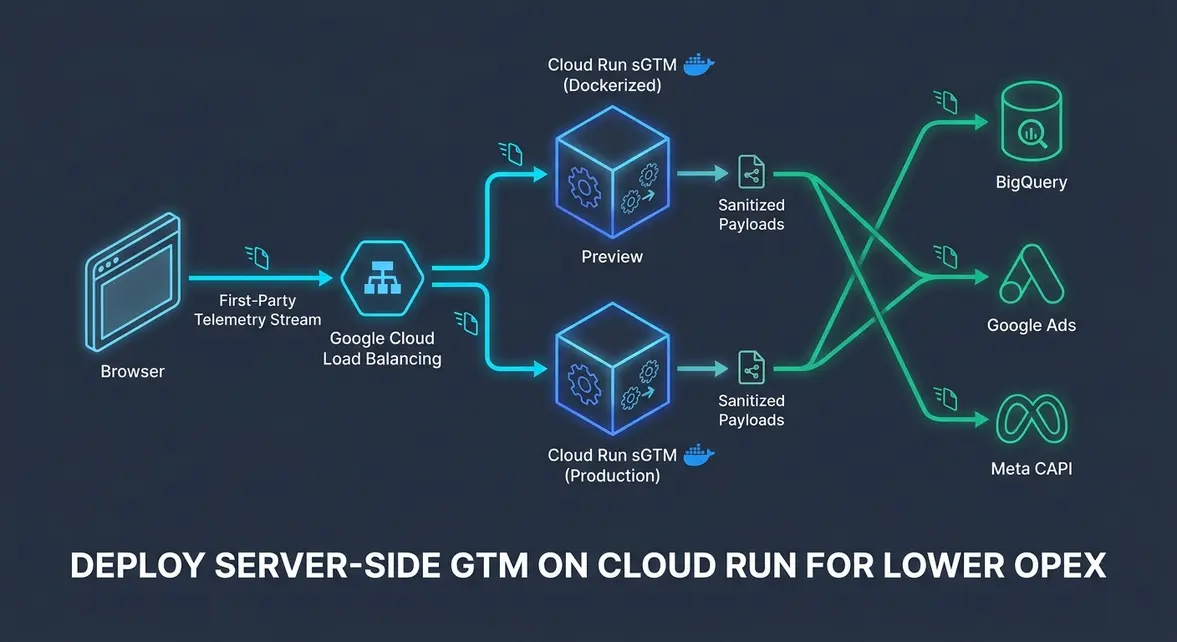
Migrating Server-Side GTM from App Engine to Cloud Run Containers
Executive Architectural Takeaway: Deploying server-side Google Tag Manager (sGTM) on Google Cloud Run replaces the rigid App Engine Flexible Environment with stateless, autoscaling Docker containers. This architecture cuts baseline compute OpEx by up to 65% while supporting deterministic concurrency tuning and regional edge routing via Cloud Load Balancing.
Legacy App Engine Flexible setups force minimum multi-instance provisioning and slow 5-to-10-minute deployment cycles on managed VMs, creating unnecessary infrastructure overhead for mid-market growth teams. By pulling Google's official gcr.io/cloud-tagging-10302018/gtm-cloud-image:stable container directly into Cloud Run, engineering teams gain sub-10-second revision rollouts, granular CPU/memory allocation (1 vCPU and 512MiB RAM per container), and native integration with VPC Serverless Connectors.
Because the GTM server image is container-native, deploying to Cloud Run decouples tag execution from App Engine's opinionated runtime. Teams can run dual-service topologies—isolating the Preview container from the high-throughput Production Tagging cluster—and scale horizontally to handle sudden paid-media traffic spikes without manual capacity provisioning.
Technical SEO, Core Web Vitals, and First-Party Telemetry Routing
Offloading third-party marketing scripts from the browser main thread to a Cloud Run tagging endpoint directly protects Core Web Vitals, specifically Interaction to Next Paint (INP < 200ms) and Largest Contentful Paint (LCP < 2.5s). Instead of forcing the client to parse and execute multiple vendor pixels (fbevents.js, bat.js, insight.min.js), the browser dispatches a single lightweight GA4 Measurement Protocol payload to a first-party subdomain such as https://sst.yourdomain.com.
Static waterfall inspection often misses runtime main-thread blocking caused by dynamically injected client-side tags during hydration. Server-side runtime execution shifts JSON payload transformation, user-agent parsing, and outbound vendor HTTP POST requests onto Cloud Run workers, reducing client-side script evaluation overhead to near 0ms during critical page-load phases.
Routing this telemetry through an External Application Load Balancer in front of Cloud Run delivers three measurable architectural advantages:
- Cold-Start & Latency Control: Setting
min-instances=1andconcurrency=80per regional Cloud Run service eliminates cold-start jitter and sustainsTTFB < 40msat the edge load balancer. - First-Party Cookie Resilience: Terminating TLS on your primary domain's subdomain allows the sGTM server to set
HttpOnly,Securefirst-party cookies (FPID), mitigating Safari ITP 7-day client-side storage expiration. - Isolated Debugging Topology: Separating the
PREVIEW_SERVER_URLendpoint ensures GTM Tag Assistant preview requests (x-gtm-server-previewheaders) never contend with production conversion ingestion.
Production Runbook: Cloud Run sGTM Deployment and BigQuery Verification
To deploy a production-ready sGTM cluster on Cloud Run, provision two separate services using your base64-encoded CONTAINER_CONFIG string from the GTM Server Container Admin panel. First deploy the Preview Server, capture its generated URL, and inject it into the Production Tagging service.
#!/usr/bin/env bash
set -euo pipefail

PROJECT_ID="your-gcp-project-id"
REGION="us-central1"
IMAGE="gcr.io/cloud-tagging-10302018/gtm-cloud-image:stable"
CONTAINER_CONFIG="aWQ9R1RNLVhYWFhYWCZlbnY9MSZhdXRoPXlvdXItYXV0aC10b2tlbg=="

# 1. Deploy the isolated Preview Server
gcloud run deploy sgtm-preview \
  --project="$PROJECT_ID" \
  --region="$REGION" \
  --image="$IMAGE" \
  --platform=managed \
  --allow-unauthenticated \
  --memory=512Mi \
  --cpu=1 \
  --min-instances=0 \
  --max-instances=2 \
  --set-env-vars="CONTAINER_CONFIG=$CONTAINER_CONFIG,RUN_AS_PREVIEW_SERVER=true"

PREVIEW_URL=$(gcloud run services describe sgtm-preview \
  --project="$PROJECT_ID" \
  --region="$REGION" \
  --format='value(status.url)')

# 2. Deploy the Production Tagging Server
gcloud run deploy sgtm-prod \
  --project="$PROJECT_ID" \
  --region="$REGION" \
  --image="$IMAGE" \
  --platform=managed \
  --allow-unauthenticated \
  --memory=512Mi \
  --cpu=1 \
  --concurrency=80 \
  --min-instances=1 \
  --max-instances=20 \
  --set-env-vars="CONTAINER_CONFIG=$CONTAINER_CONFIG,PREVIEW_SERVER_URL=$PREVIEW_URL"
Once DNS CNAME or A-records point sst.yourdomain.com through your Cloud Load Balancer to sgtm-prod, validate ingestion parity and first-party cookie persistence in BigQuery. The partitioned SQL query below audits FPID continuity and measures server-side event delivery volume against missing client identifiers.
SELECT
  PARSE_DATE('%Y%m%d', event_date) AS telemetry_date,
  COUNT(*) AS total_events,
  COUNTIF(user_pseudo_id IS NOT NULL) AS valid_client_ids,
  COUNTIF(
    EXISTS(
      SELECT 1 FROM UNNEST(event_params)
      WHERE key = 'ga_session_id'
    )
  ) AS session_hydrated_events,
  ROUND(
    SAFE_DIVIDE(
      COUNTIF(user_pseudo_id IS NOT NULL),
      COUNT(*)
    ) * 100,
    2
  ) AS attribution_integrity_pct
FROM
  `your-gcp-project-id.analytics_123456789.events_*`
WHERE
  _TABLE_SUFFIX BETWEEN FORMAT_DATE('%Y%m%d', DATE_SUB(CURRENT_DATE(), INTERVAL 7 DAY))
  AND FORMAT_DATE('%Y%m%d', CURRENT_DATE())
  AND event_name IN ('page_view', 'generate_lead', 'purchase')
GROUP BY
  telemetry_date
ORDER BY
  telemetry_date DESC;
B2B Growth, Pipeline Hygiene, and GDPR Compliance Leverage
For B2B SaaS teams scaling paid acquisition across LinkedIn Ads, Google Ads, and Meta Conversions API (CAPI), client-side ad blockers and strict browser privacy defaults drop 15% to 30% of conversion telemetry. Routing events through a dedicated Cloud Run sGTM cluster preserves click identifiers (gclid, li_fat_id, fbclid) inside first-party server requests and enables asynchronous enrichment from internal CRM webhooks before dispatching downstream conversion APIs, reducing effective blended CAC.
From a SOC 2 and GDPR governance standpoint, running sGTM inside a private GCP Cloud Run perimeter acts as a programmable data firewall. Growth engineers can inspect incoming payloads inside custom sGTM Server Templates—referencing variables like {{Event Data - Email}} or {{Client IP Override}}—to apply SHA-256 hashing or strip raw PII entirely before forwarding sanitized schemas to external ad networks, eliminating unauthorized third-party DOM scraping.
System Telemetry Source: Original Engineering Report
Related Growth Blueprints
All Playbooks →Want this working inside your business?
Whether you're a founder fixing tracking leaks or a team scaling SEO and AI workflows, share your site and bottleneck for a clear diagnostic within 48 hours.