Fix GTM Cross-Domain Regex Without Lookbehinds
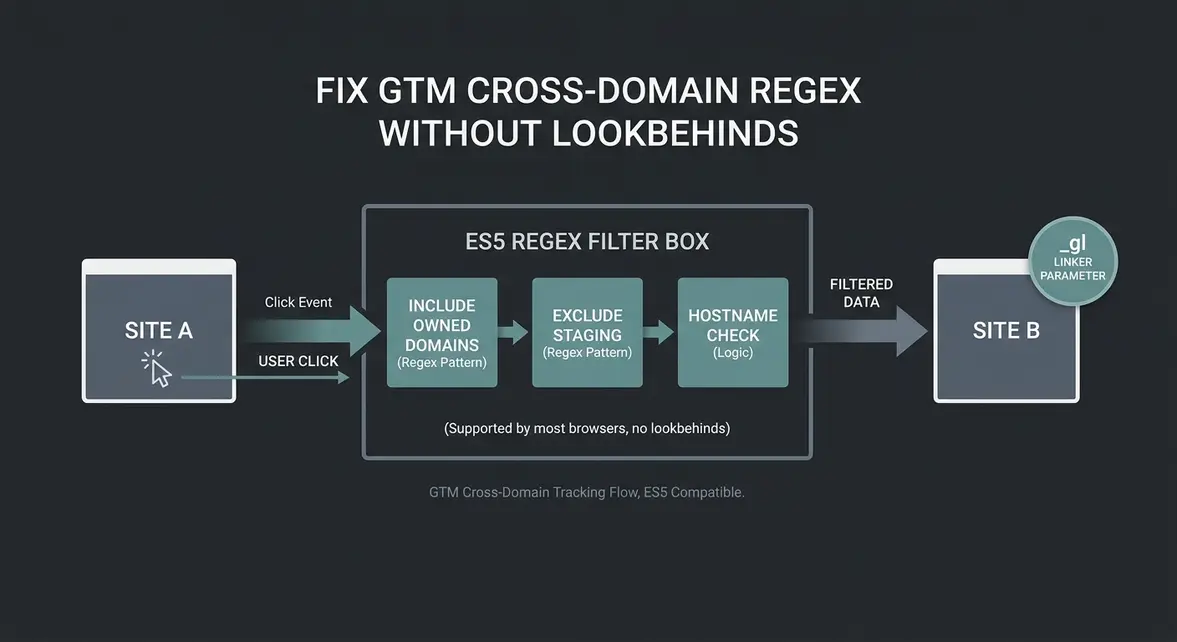
Stop Losing Attribution Across Checkout Domains
Plain-English Takeaway: When a visitor moves from your main website to an external checkout or booking domain, standard analytics often resets their session and miscredits the traffic source. Using safe regular expressions (regex) in Google Tag Manager (GTM) keeps cross-domain tracking parameters intact across multiple hostnames without triggering GTM JavaScript compilation errors.
Cross-domain tracking works by appending a linker identifier (such as _gl in GA4) to outbound URLs so the receiving domain knows it is the same visitor. While GTM lets you list domains manually in your tag settings, managing dozens of regional subdomains or partner storefronts quickly becomes error-prone. Attempting to solve this with modern regex patterns containing negative lookbehinds fails in GTM because the container compiler enforces older ES5 JavaScript rules and rejects lookbehind syntax on save.
How Safe Domain Matching Works in GTM
Think of cross-domain linking as handing a visitor a stamped ticket as they exit Site A so Site B recognizes them at the door. Instead of maintaining a fragile manual list of every possible destination hostname, you can evaluate destination URLs dynamically using a simple matching rule that isolates owned domains from third-party outbound links.
Because GTM's Custom JavaScript parser rejects ES2018 features like negative lookbehinds, the cleanest architectural fix is separating inclusion and exclusion checks. Rather than packing complex lookbehind assertions into one regex string, you run two fast, readable checks in sequence:
- Inclusion check: Match the clicked URL from
{{Click URL}}against a standard regex group listing your root domains and allowed subdomains. - Exclusion check: Reject staging or development prefixes (such as
staging.ordev.) using a straightforward boolean test before any linker logic runs. - Same-host guard: Compare the extracted target hostname against
{{Page Hostname}}so internal navigation links never receive unnecessary cross-domain parameters.
Implementing ES5-Safe Auto-Link Regex in GTM
In GTM, create a Custom JavaScript Variable named CJS - Is Valid Cross Domain Target and paste the ES5-compliant script below. You can use this variable inside your link-click triggers or adapt the domain list for your Google Tag linker configuration.
function() {
  var targetUrl = {{Click URL}} || '';
  var currentHost = {{Page Hostname}} || '';

  // Match owned domains and subdomains without ES2018 negative lookbehinds
  var ownedDomainsPattern = /^https?:\/\/([a-z0-9-]+\.)?(example\.com|checkout-partner\.io)(\/|$)/i;
  var stagingExcludePattern = /^https?:\/\/(staging|dev)\./i;

  if (!ownedDomainsPattern.test(targetUrl) || stagingExcludePattern.test(targetUrl)) {
    return false;
  }

  // Extract hostname to avoid decorating same-domain links
  var match = targetUrl.match(/^https?:\/\/([^\/:?#]+)/i);
  var targetHost = match ? match[1].toLowerCase() : '';

  return targetHost !== '' && targetHost !== currentHost.toLowerCase();
}
Save the variable and verify it in GTM Preview mode by clicking between your main domain and your checkout domain. To confirm that your _gl linker parameters survive server redirects and actually fire on the destination page, run your live flow through our Tracking Inspector.
Impact on Attribution Accuracy and Maintenance
Replacing hardcoded domain lists and broken lookbehind patterns protects revenue attribution across multi-domain funnels. Marketing teams stop seeing their own primary domain or payment processor show up as the top referral source in GA4, keeping acquisition cost and return-on-ad-spend reporting accurate across paid channels.
For engineering and analytics operators, splitting exclusion checks from domain-matching regex removes a common source of GTM container publish failures. Adding a new regional storefront or checkout partner requires updating one ES5-safe pattern instead of auditing multiple individual tag configurations.
System Telemetry Source: Original Engineering Report
Related Growth Blueprints
All Playbooks →Want this working inside your business?
Whether you're a founder fixing tracking leaks or a team scaling SEO and AI workflows, share your site and bottleneck for a clear diagnostic within 48 hours.