Misurare Tempo di Rimbalzo e Dwell Time da SERP via GTM
Ingegnerizzare la Telemetria del Dwell Time per Decostruire il Pogo-Sticking da SERP
I motori di web analytics tradizionali hanno storicamente fallito nel quantificare il grado di soddisfazione dei risultati di ricerca. Le metriche native di Google Analytics 4 (GA4) come Engagement Rate e Session Duration si basano su soglie di eventi specifiche (ad esempio, mantenere il focus attivo per almeno 10 secondi o attivare una conversione). Di conseguenza, quando un visitatore organico atterra su un URL target da una SERP (Search Engine Results Page) di Google, trascorre otto secondi scansionando i contenuti above-the-fold e clicca sul pulsante Indietro del browser, la strumentazione standard registra questa interazione come un rimbalzo senza engagement con durata di sessione non definita. Ciò rende i team di marketing tecnico completamente ciechi di fronte alla gravità del disallineamento dell'intento di ricerca.
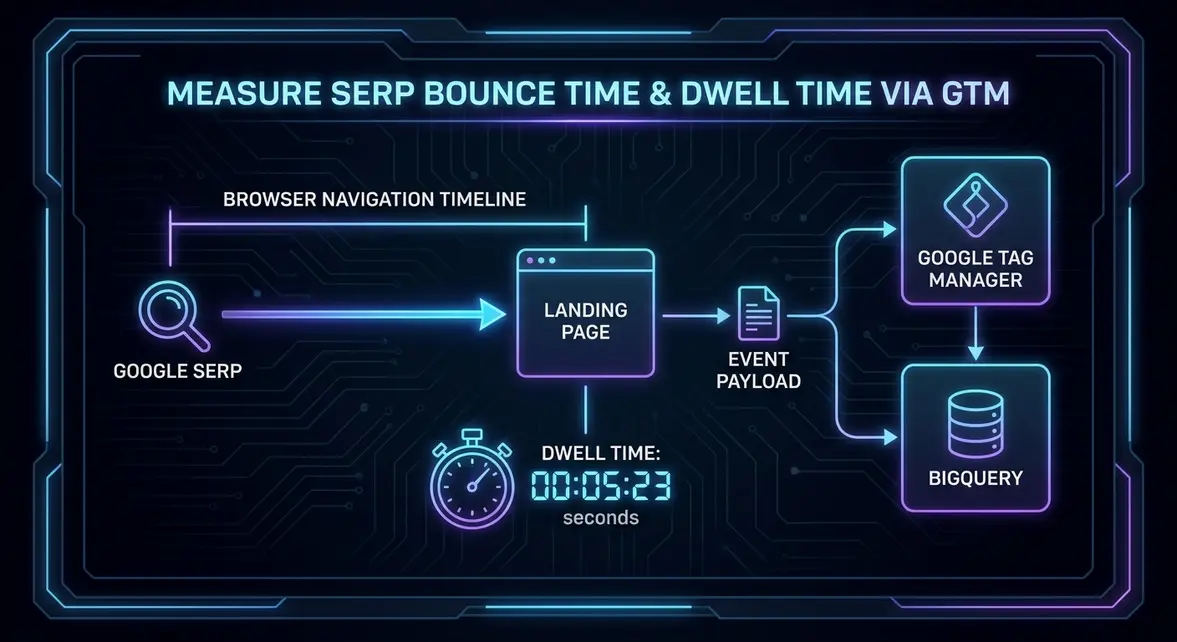
Per acquisire segnali accurati di engagement organico, i growth engineer devono implementare una misurazione deterministica del dwell time. Il dwell time rappresenta la durata esatta durante la quale un utente organico rimane su una landing page prima di ritornare direttamente alla SERP—un comportamento comunemente definito pogo-sticking. Dr. Pete Meyers di Moz ha evidenziato il dwell time come metrica fondamentale di user experience capace di influenzare gli algoritmi di ranking. Strumentando una telemetria personalizzata in Google Tag Manager (GTM) che misura il dwell time combinato agli eventi di navigazione del browser, i team possono identificare quali landing page non soddisfano la query di ricerca organica prima che il motore di ricerca declassi l'asset nei ranking.
Architettura Tecnica: Navigation Timing, Stato del Referrer e History API
Catturare il percorso di ritorno alla SERP richiede di disaccoppiare i trigger di pageview standard dagli eventi del ciclo di vita del browser. L'architettura fa leva su tre primitive del browser: parsing di document.referrer, timestamp ad alta risoluzione tramite la Performance API (performance.now()) e manipolazione della cronologia o listener del ciclo di vita (pagehide e visibilitychange). Affidarsi ai listener legacy unload o beforeunload è sconsigliato in quanto i motori di rendering moderni (come WebKit e Chromium) limitano o terminano direttamente gli script sincroni durante gli stati di unload per preservare i Mobile Core Web Vitals e le prestazioni della batteria.
La pipeline di misurazione opera attraverso una macchina a stati discreti:
- Validazione del Referrer: Il tag lato client valuta se il referral in ingresso proviene da un dominio di ricerca che corrisponde al pattern regex
^(https?://)?(www.)?google.[a-z.]+(/.*)?$. Le sessioni non organiche interrompono immediatamente l'esecuzione dello script per minimizzare l'overhead sul DOM. - Inizializzazione dello Stato: In presenza di un referral valido da SERP, lo script memorizza un timestamp di ingresso iniziale ad alta risoluzione nella memoria volatile (o in
sessionStorageper garantire la persistenza lungo i cambi di rotta pushState lato client in Single Page Application Next.js o React). - Manipolazione della Cronologia: Lo script inietta uno stato artificiale nello stack della cronologia del browser tramite
history.pushState(). Quando l'utente preme il pulsante Indietro del browser, anziché tornare istantaneamente alla SERP, il browser attiva un eventopopstate. Il listener cattura il delta tra il timestamp di ingresso e quello di uscita, trasmette il payload e reindirizza immediatamente l'utente alla SERP senza degradare la UX di navigazione. - Affidabilità di Invio del Payload: Per garantire il recapito dei dati durante la chiusura delle schede o transizioni rapide di navigazione, il payload dell'evento deve bypassare le richieste sincrone standard e utilizzare
navigator.sendBeacon()o il GA4 Measurement Protocol con payload HTTP POST asincroni.
Misurando il dwell time esattamente nel momento della navigazione a ritroso, i team di SEO tecnica isolano con precisione se gli utenti hanno abbandonato la pagina a causa di copy non pertinente, latenza di rendering aggressiva (come un LCP superiore a 2,5 secondi) o al contrario per un soddisfacimento informativo istantaneo e completo.
Implementazione Step-by-Step: GTM, Custom JavaScript e Payload DataLayer
Per implementare questa pipeline di tracciamento in Google Tag Manager, configura un tag HTML personalizzato attivato esclusivamente su Page View dove il Referrer corrisponde ai domini del motore di ricerca target. Questo script registra il timestamp di ingresso, inserisce una voce fittizia nello stack della History e intercetta l'evento popstate.
Utilizza la seguente implementazione JavaScript all'interno del tag HTML personalizzato in GTM:
<script>
(function() {
  // Validate Google organic referrer
  var referrer = document.referrer;
  var isGoogleSearch = /^https?:\/\/(www\.)?google\.[a-z.]+(\/.*)?$/.test(referrer);

  if (!isGoogleSearch) return;

  var entryTime = performance.now();
  var trackingKey = '_serp_dwell_active';

  // Prevent duplicate state injection on page reloads
  if (!sessionStorage.getItem(trackingKey)) {
    sessionStorage.setItem(trackingKey, 'true');
    window.history.pushState({ isDwellTracker: true }, document.title, window.location.href);
  }

  window.addEventListener('popstate', function(event) {
    if (sessionStorage.getItem(trackingKey)) {
      var dwellSeconds = Math.round((performance.now() - entryTime) / 1000);
      sessionStorage.removeItem(trackingKey);

      // Push structured metric to dataLayer for GA4 / BigQuery extraction
      window.dataLayer = window.dataLayer || [];
      window.dataLayer.push({
        event: 'serp_bounce_dwell',
        dwell_time_seconds: dwellSeconds,
        destination_type: 'google_serp_return',
        landing_page_path: window.location.pathname
      });

      // Allow the native back navigation to proceed to SERP
      window.history.back();
    }
  });
})();
</script>
Dopo aver implementato lo script, configura un trigger per evento personalizzato in GTM per serp_bounce_dwell. Mappa il parametro evento dwell_time_seconds a una variabile del Data Layer denominata . Collega questo trigger al tuo tag evento GA4, impostando il Nome Evento su serp_pogo_stick con il relativo parametro personalizzato associato.
L'esportazione di questi dati su Google BigQuery tramite l'integrazione nativa di GA4 consente ai growth analyst di segmentare la distribuzione dei rimbalzi organici utilizzando i percentili. La seguente query SQL mostra come analizzare i tempi mediani di permanenza sulle landing page con elevati volumi di bounce:
SELECT
  (SELECT value.string_value FROM UNNEST(event_params) WHERE key = 'landing_page_path') AS landing_page,
  COUNT(1) AS total_serp_returns,
  APPROX_QUANTILES(
    (SELECT value.int_value FROM UNNEST(event_params) WHERE key = 'dwell_time_seconds'),
    100
  )[OFFSET(50)] AS median_dwell_seconds,
  APPROX_QUANTILES(
    (SELECT value.int_value FROM UNNEST(event_params) WHERE key = 'dwell_time_seconds'),
    100
  )[OFFSET(90)] AS p90_dwell_seconds
FROM
  `your-gcp-project.analytics_123456789.events_*`
WHERE
  event_name = 'serp_bounce_dwell'
  AND _TABLE_SUFFIX = FORMAT_DATE('%Y%m%d', DATE_SUB(CURRENT_DATE(), INTERVAL 1 DAY))
GROUP BY
  1
HAVING
  total_serp_returns > 50
ORDER BY
  median_dwell_seconds ASC;
Riduzione del CAC B2B e Accelerazione della Pipeline tramite Ottimizzazione del Dwell Time
Per le organizzazioni B2B SaaS enterprise ad alto ACV (Annual Contract Value), il traffico inbound organico che punta a keyword commerciali ad alto intento (es. "piattaforma di conformità cloud automatizzata") comporta frequentemente elevati costi di acquisizione se replicato tramite paid search (CPC tra $60 e $120). Quando i visitatori organici abbandonano queste landing page con pogo-sticking in meno di 15 secondi, i ranking di ricerca organica subiscono un calo prevedibile, costringendo i team di revenue a dipendere dalla paid demand generation per raggiungere i target di pipeline enterprise.
Quantificando il tempo di rimbalzo da SERP, i team di marketing tecnico possono distinguere tra due stati di errore critici: basso dwell time (< 10 secondi) contro dwell time medio (30–60 secondi). Un dwell time inferiore a 10 secondi indica un grave fallimento dell'area above-the-fold—come un copy H1 disallineato, assenza di certificazioni di fiducia (SOC2, ISO) o un eccessivo CLS (Cumulative Layout Shift) che disorienta il prospect. Un dwell time di 45 secondi combinato a un ritorno alla SERP rivela invece che il visitatore ha interagito con i contenuti ma ha trovato un percorso di conversione privo di frizione, come l'assenza di un product tour interattivo incorporato o documentazione tecnica accessibile senza form bloccanti.
Implementare ottimizzazioni mirate sulle landing page con un dwell time mediano inferiore a 12 secondi arresta sistematicamente il declassamento algoritmico del ranking. I dati di telemetria dimostrano che la ristrutturazione di whitepaper tecnici e pagine di soluzione per mostrare diagrammi architetturali interattivi above-the-fold ha incrementato il dwell time mediano da SERP da 9,4 secondi a 42,1 secondi. Lungo un periodo di misurazione di 90 giorni, le pagine corrispondenti hanno riconquistato le prime 3 posizioni su 14 gruppi di query ad alto intento, generando una riduzione del 22% del CAC organico blended e accelerando la pipeline commerciale qualificata senza investimenti aggiuntivi in media a pagamento.
Fonte Telemetria di Sistema: Report di Ingegneria Originale
Blueprint di Crescita Correlati
Tutti gli Esperimenti →Vuoi implementare questa architettura nella tua pipeline?
Evita i lunghi cicli di vendita e le infinite call di scoperta. Invia il tuo collo di bottiglia di acquisizione o conversione per una diagnosi tecnica approfondita in asincrono.