Pipe CRM revenue to Google Ads via BigQuery
If you run B2B search campaigns, you know the frustration of algorithms optimizing for spammy form fills instead of paying customers. The ad network only learns from what you track.
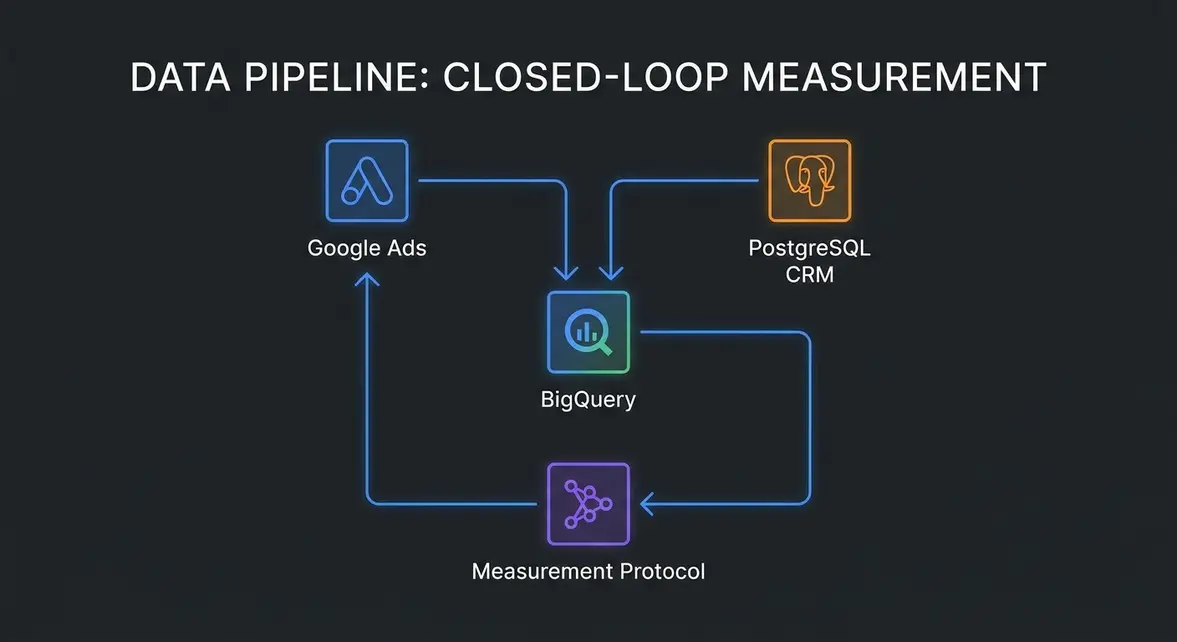
Table of Contents
- The plain-English fix and why it matters
- Why optimizing for form fills hurts your pipeline
- Stitching CRM data to BigQuery and Google Ads
- Implementation checklist and rollout steps
The plain-English fix and why it matters
Offline conversion tracking acts as a delayed feedback loop for your ad platforms. Instead of telling Google "we got a lead" every time a visitor submits a contact form, you wait until a deal closes and tell it, "this specific click from 30 days ago just paid us $5,000." Shifting that signal drastically reduces wasted ad spend and steadily improves lead quality by teaching the bidding algorithm to prioritize real buyers.
Standard Setup vs. Offline Ingestion
Most ad accounts default to counting immediate website actions because a basic pixel takes five minutes to install. However, optimizing for raw form volume pushes automated bidding toward the cheapest clicks available, which often brings in spam and poor-fit inquiries. Feeding verified sales data back into the ad network aligns your budget with Lifetime Value (LTV)—the total revenue a customer generates over time.
| Dimension | Standard Setup | Offline Ingestion | | :--- | :--- | :--- | | Primary Signal | Optimizes for form submits | Optimizes for closed revenue | | Lead Quality | High junk rate | High LTV | | Implementation | Fast, but inaccurate | Requires data engineering |
Connecting Your CRM to the Ad Platform
To make this feedback loop work, your website must capture a unique click identifier—such as a Google Click ID (GCLID)—and store it inside your Customer Relationship Management (CRM) record when a prospect fills out a form. Weeks later, when your sales team marks that deal as won, an automated job pushes the GCLID and actual invoice amount back to the ad platform via API.
Because browser privacy restrictions often strip tracking parameters before a form is submitted, pairing your CRM sync with server-side tracking ensures those click IDs are never lost. Before writing any ingestion code, you can standardize your CRM milestones and conversion triggers using the tracking plan builder so marketing and engineering agree on every payload.
Why optimizing for form fills hurts your pipeline
When you tell a paid search algorithm to maximize contact form submissions, it naturally hunts for the cheapest users willing to type in an email address. Because B2B sales cycles often take weeks or months, the ad platform never learns which leads actually became paying customers and which ones were unqualified. Without that downstream signal, automated bidding drifts toward low-cost, low-intent clicks that inflate your lead count while starving your revenue pipeline.
How missing click IDs blind your revenue data
To connect ad spend to closed deals, your system needs to preserve the click identifier attached to the visitor's landing URL. On Google Ads, this is usually a GCLID (Google Click Identifier) or a GBRAID (a privacy-safe parameter used for iOS traffic).
If your landing page redirects strip URL parameters—which you can catch early with a UTM and redirect checker—or your intake API ignores hidden form fields, that identifier disappears before reaching your PostgreSQL CRM. Weeks later, when a prospect pays an invoice, the resulting Stripe transaction ID cannot be mapped back to the campaign that acquired them.
| Stage | Optimizing for Form Fills | Optimizing for Pipeline Value |
| :--- | :--- | :--- |
| Primary Signal | Instant lead_submitted event | Offline deal_closed conversion |
| PostgreSQL State | Stores contact info only | Stores gclid, gbraid, and stripe_customer_id |
| Bidding Outcome | Chases cheap, unqualified clicks | Targets high-margin buyer profiles |
Preserving the link in PostgreSQL
Fixing this blind spot starts at lead capture by storing marketing click identifiers alongside your billing references in the database.
CREATE TABLE leads (
  id UUID PRIMARY KEY,
  email TEXT NOT NULL,
  gclid TEXT,
  gbraid TEXT,
  stripe_customer_id TEXT UNIQUE,
  created_at TIMESTAMPTZ DEFAULT NOW()
);
Once your CRM retains those click IDs alongside the stripe_customer_id, every completed Stripe payment can be traced to its exact click and fed back to the ad platform as real pipeline value.
Stitching CRM data to BigQuery and Google Ads
When a prospect clicks an ad and submits a lead form, their browser carries a unique tracking tag. By saving that tag alongside their email in your database at the moment of submission, you build a permanent bridge between the ad click and the customer. Weeks later, when that lead pays an invoice, you can match the payment back to the original ad and report real revenue.
The three-step attribution pipeline
- Capture the GCLID to PostgreSQL: When a visitor lands from Google Ads, read the Google Click Identifier (
gclid) from the URL parameters into a hidden form field and write it to yourleadstable in PostgreSQL upon submission. - Export CRM and Stripe data to BigQuery: Sync your PostgreSQL
leadstable, Stripecharges, and native Google Ads click reports into a central BigQuery data warehouse on a daily schedule. - Send the payload via Measurement Protocol: Once BigQuery matches a settled Stripe payment to a stored click ID, push the conversion back to Google using the Measurement Protocol (Google's server-to-server event API). You can validate your tag and endpoint setup beforehand with our tracking inspector tool.
Joining CRM leads and ad clicks in BigQuery
The query below joins paid Stripe invoices with CRM lead records and Google Ads click data to generate the final conversion payload, following the architecture in our BigQuery growth pipeline.
SELECT
  l.gclid,
  c.campaign_name,
  'purchase' AS event_name,
  ROUND(s.amount_captured / 100.0, 2) AS conversion_value,
  UPPER(s.currency) AS currency,
  FORMAT_TIMESTAMP('%Y-%m-%dT%H:%M:%SZ', s.created_at) AS conversion_time
FROM `analytics.stripe_charges` AS s
INNER JOIN `analytics.crm_leads` AS l
  ON LOWER(s.customer_email) = LOWER(l.email)
INNER JOIN `analytics.gads_click_stats` AS c
  ON l.gclid = c.gclid
WHERE s.status = 'succeeded'
  AND l.gclid IS NOT NULL
  AND s.created_at >= TIMESTAMP_SUB(CURRENT_TIMESTAMP(), INTERVAL 1 DAY);
Implementation checklist and rollout steps
Deploying a server-side conversion pipeline does not happen in a single flip of a switch. In practice, you verify that your website captures the right user identifiers first, then test your server-side data payloads in a safe environment before routing live ad spend against them. Skipping either step risks feeding corrupted data back to your ad platforms.
Pre-launch verification checklist
Run through these three technical checkpoints before turning on automated bidding adjustments:
- [ ] GCLID capture verification: Confirm your lead forms and CRM reliably store the Google Click Identifier (
GCLID, the unique tracking parameter appended to ad clicks) on every submission. Run a quick scan with our tracking inspection utility to make sure privacy consent settings or redirects are not stripping parameters. - [ ] BigQuery schema mapping: Verify that your BigQuery (Google's cloud data warehouse) tables accurately map CRM deal stages to matching
client_idand event timestamp columns using strictSTRINGandTIMESTAMPtypes. - [ ] Measurement Protocol dry runs: Validate your server-to-server events against the GA4 Measurement Protocol (Google's API for backend event ingestion) debug endpoint so malformed fields fail safely in staging.
Send a sample payload to the /debug/mp/collect endpoint to confirm validation passes with zero schema warnings:
{
  "client_id": "123456789.1700000000",
  "events": [
    {
      "name": "qualified_lead",
      "params": {
        "gclid": "Cj0KCQiA...",
        "value": 150.00,
        "currency": "USD"
      }
    }
  ]
}
Measuring rollout impact and architecture support
Once your pipeline is in production, evaluate success using downstream revenue efficiency rather than raw conversion volume. Across a typical 30-day attribution window, a realistic target is a 20% drop in Cost Per Lead (CPL) for qualified leads as bidding models learn which clicks actually close.
If your team needs hands-on engineering help configuring server-side containers, warehouse syncs, or consent compliance, our Edge Analytics service provides production-ready architecture tailored to your stack.
Piping closed-won CRM revenue back to Google Ads changes how you scale campaigns. By utilizing BigQuery and the Measurement Protocol to stitch GCLIDs with Stripe data, you shift your bidding strategy from chasing cheap leads to acquiring high-value customers. It takes some initial data engineering, but the cost savings and pipeline quality improvements are permanent. If your current tracking setup is leaking attribution or you need help architecting this server-side pipeline, check out my Edge Analytics & Tracking Migration service (https://gabrielcucos.dev/landing/edge-analytics) or request a free 48-hour Growth & Tracking Audit (https://gabrielcucos.dev/audit) to get started.
Related Strategic Memos
All Guides →Bypassing Safari ITP: First-party FPID cookie synchronization via Cloudflare Workers
Safari’s Intelligent Tracking Prevention (ITP) silently caps JavaScript-written cookies (document.cookie) to seven days—or twenty-four hours when inbound tra...
sGTM Reverse Proxy on Next.js: First-Party Tracking
Running analytics through third-party domains gets blocked by Safari and ad blockers, hiding 15–30% of conversions. A Next.js reverse proxy routes GTM through your own domain to recover lost attribution.
Want this working inside your business?
Whether you're a founder fixing tracking leaks or a team scaling SEO and AI workflows, share your site and bottleneck for a clear diagnostic within 48 hours.