Unified Android Analytics: Firebase & GTM Pipeline
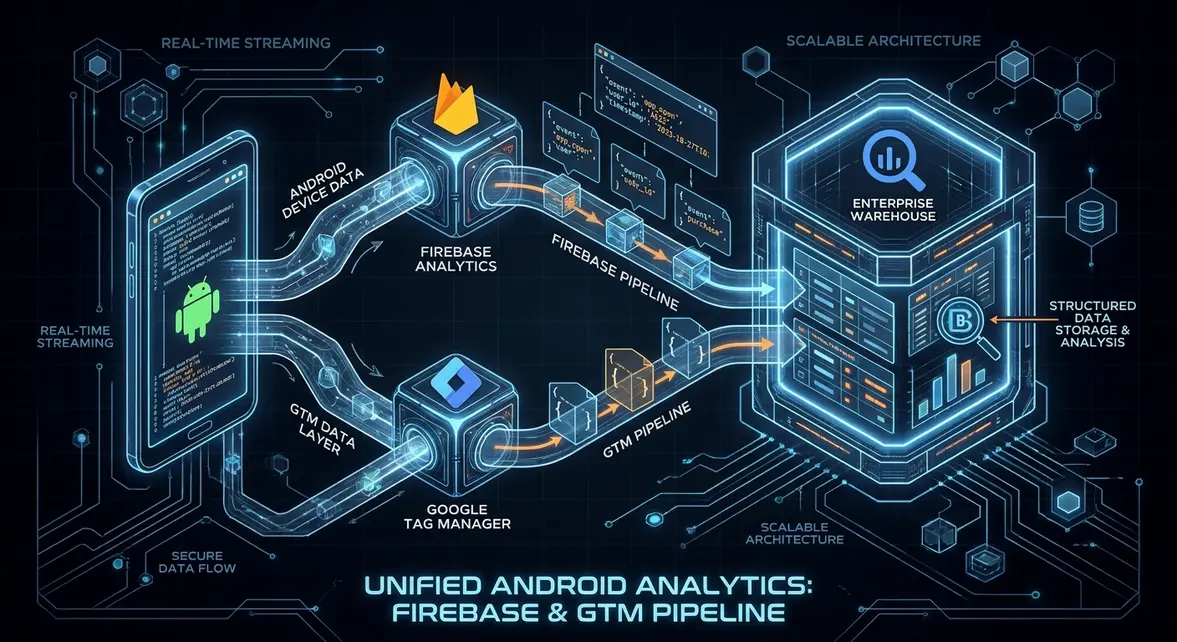
Unified Event Streams: Modernizing Mobile Instrumentation via Firebase and GTM
Executive Architectural Takeaway: Migrating mobile telemetry from deprecated standalone SDKs to Google Analytics for Firebase paired with Google Tag Manager v5 establishes an event-driven, unified data model across Android and web applications. This setup eliminates dual-pipeline data divergence, standardizes custom parameter payloads, and facilitates deterministic cross-surface user attribution via BigQuery. Operating through a consolidated schema reduces client-side processing overhead while enabling real-time event routing to third-party endpoints without requiring APK recompilation.
Historically, mobile tracking relied on siloed Universal Analytics mobile SDKs that operated on rigid hit types (ScreenView, Event, Transaction) fundamentally divorced from web analytics architectures. Engineering teams were forced to maintain dual attribution pipelines, resulting in disjointed session states, unaligned user identifiers, and discrepancies exceeding 25% when mapping unified web-to-app customer journeys. The convergence toward Google Analytics 4 (App + Web) relies on the Firebase Analytics C++ and Java/Kotlin runtimes as the native telemetry baseline. Events dispatched from the Android runtime are collected directly through FirebaseAnalytics, passed locally through the Google Tag Manager runtime container (tagmanager.google.com), and routed downstream to unified analytics backends.
This decoupled architecture separates event logging from tag dispatch. Growth engineering teams can fire arbitrary mobile analytical events via the native platform API and dynamically alter downstream vendor destinations, modify event payloads, or conditionally drop tracking hits based on runtime consent flags without pushing application updates through the Google Play Store review pipeline.
Cross-Platform Identity Resolution and Deep-Link Data Architecture
Transitioning to a unified Firebase and GTM engine reshapes technical search attribution and application indexing workflows. When web users transition to native Android interfaces through App Links verified by assetlinks.json, deep-link query parameters (utm_source, utm_medium, gclid) often drop at the OS intent filter boundary. By instrumenting deep-link handlers inside Android activities to extract incoming Intent URIs and forward them directly into FirebaseAnalytics.logEvent(), teams maintain strict provenance records across both organic web discovery and in-app activation funnels.
The underlying data model changes from screen-centric sessions to an unopinionated event-and-parameter stream. Inside the Firebase pipeline, sessions are derived downstream from continuous sequences of events using ga_session_id and ga_session_number parameters rather than rigid client-side timeouts. Key architectural advantages include:
- Deterministic Identity Stitching: Continuous persistence of
user_idacross web sessions and native application states allows BigQuery export engines to backfill touchpoints across multi-device acquisition paths. - Reduced Memory and Thread Contention: Analytics batching runs asynchronously off the UI main thread via the Firebase Worker thread pool, ensuring zero UI frame drops (maintaining 60fps/120fps thresholds).
- Offline Resilience: Local SQLite storage queues payloads on the device when connectivity drops, automatically flushing events via gzip-compressed HTTP POST payloads once network connectivity returns, preserving telemetry completeness.
Marketing Operations Implementation: Android Runtime to BigQuery Runbook
To implement this pipeline, first add the Firebase Analytics and Google Tag Manager dependencies to your Android project's app/build.gradle file. Ensure the Google Services Gradle plugin is applied to process the google-services.json configuration file at compile time.
dependencies {
    implementation platform('com.google.firebase:firebase-bom:32.8.0')
    implementation 'com.google.firebase:firebase-analytics-ktx'
    implementation 'com.google.android.gms:play-services-tagmanager:18.0.4'
}
Next, initialize the analytics client and log typed domain events with contextual attribution parameters inside your core Android Activity or navigation listener. This dispatches events both to the Firebase backend and into the local GTM container runtime:
package com.enterprise.growth

import android.os.Bundle
import androidx.appcompat.app.AppCompatActivity
import com.google.firebase.analytics.FirebaseAnalytics
import com.google.firebase.analytics.ktx.analytics
import com.google.firebase.analytics.ktx.logEvent
import com.google.firebase.ktx.Firebase

class CheckoutActivity : AppCompatActivity() {
    private lateinit var firebaseAnalytics: FirebaseAnalytics

    override fun onCreate(savedInstanceState: Bundle?) {
        super.onCreate(savedInstanceState)
        firebaseAnalytics = Firebase.analytics

        // Log high-value pipeline conversion with contextual parameters
        firebaseAnalytics.logEvent("subscription_activated") {
            param(FirebaseAnalytics.Param.CURRENCY, "USD")
            param(FirebaseAnalytics.Param.VALUE, 2400.00)
            param("plan_tier", "enterprise_annual")
            param("account_id", "org_89234b")
            param("attribution_network", "organic_search")
        }
    }
}
Download your mobile GTM container (GTM-XXXXX.json) from the Google Tag Manager console, place it in app/src/main/assets/containers/, and configure tag firing rules triggered by Firebase Event names. To stitch mobile sessions with web events, query the native raw daily export in BigQuery:
WITH unified_events AS (
  SELECT
    event_timestamp,
    event_name,
    user_pseudo_id,
    (SELECT value.string_value FROM UNNEST(event_params) WHERE key = 'ga_session_id') AS session_id,
    platform,
    geo.country AS country,
    traffic_source.source AS source,
    traffic_source.medium AS medium
  FROM
    `enterprise-growth-analytics.analytics_284729103.events_*`
  WHERE
    _TABLE_SUFFIX = FORMAT_DATE('%Y%m%d', DATE_SUB(CURRENT_DATE(), INTERVAL 1 DAY))
)
SELECT
  platform,
  source,
  medium,
  COUNT(DISTINCT user_pseudo_id) AS unique_users,
  COUNT(DISTINCT session_id) AS total_sessions,
  COUNTIF(event_name = 'subscription_activated') AS conversion_volume
FROM
  unified_events
GROUP BY
  platform, source, medium
ORDER BY
  conversion_volume DESC;
Enterprise Growth & MRR Leverage: Attribution Hygiene and Pipeline Velocity
Unifying Android and Web event ingestion directly addresses revenue leakages common in product-led B2B funnels. High-ACV buyers routinely discover products through technical desktop queries, evaluate whitepapers via organic web touchpoints, and subsequently complete admin provisioning or two-factor authentication inside the native mobile client. Under fragmented tracking models, mobile acquisitions are systematically misattributed to direct traffic, leading growth teams to over-allocate budget to paid brand search while defunding organic technical content production.
Consolidating data ingestion through Firebase and sGTM mitigates GDPR and SOC 2 compliance risks by standardizing consent flags across native app states and web runtimes. Client-side signals like {{Consent State}} can block or redact downstream PII payloads at the tag manager layer prior to egress, preventing unencrypted identifier leakage across external tracking vendors. Furthermore, utilizing the native Firebase SDK prevents third-party SDK bloat inside the APK, keeping cold-start initialization latency under 12ms and maintaining application store performance standards essential for organic Play Store ranking.
System Telemetry Source: Original Engineering Report
Related Growth Blueprints
All Playbooks →Want this working inside your business?
Whether you're a founder fixing tracking leaks or a team scaling SEO and AI workflows, share your site and bottleneck for a clear diagnostic within 48 hours.