Fixing Ecommerce Data Layer Pitfalls in GA4 & GTM
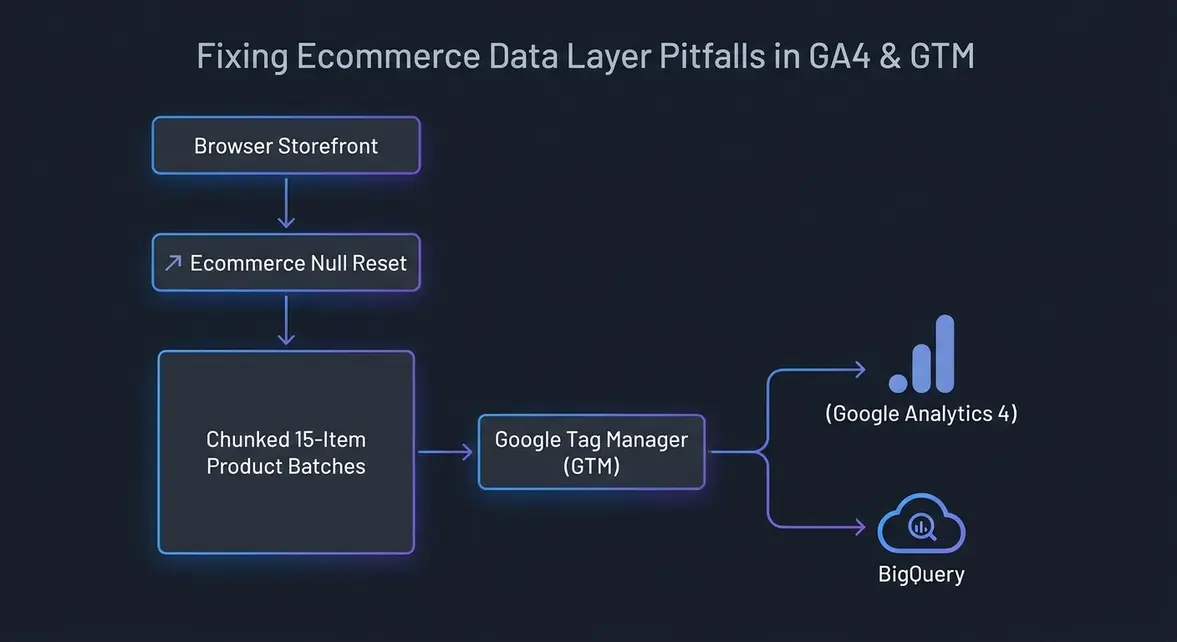
Prevent Revenue Attribution Drift From Dirty Ecommerce Data Layers
Plain-English Takeaway: When your ecommerce tracking fails to clear old product data between clicks or exceeds browser payload limits, Google Analytics 4 (GA4) silently drops checkout events and misattributes revenue. Standardizing your dataLayer (the JavaScript array that passes site events to Google Tag Manager) with explicit state resets and lean product payloads recovers lost funnel visibility without changing your storefront UI.
As Simo Ahava documented in his foundational Enhanced Ecommerce findings, reading the official documentation rarely protects teams from production edge cases. Even when individual tags fire with status 200, subtle state leaks cause previous product arrays to bleed into subsequent checkout steps, while oversized category-page impressions quietly get truncated before reaching your analytics property.
How State Resets and Payload Caps Stabilize Funnel Tracking
Google Tag Manager (GTM) maintains an internal data model that merges every new dataLayer.push() into the existing state rather than replacing it. On modern single-page applications or AJAX-driven storefronts, if a user views a product and then triggers a custom event or a partial cart update without wiping the prior ecommerce object, GTM can inadvertently carry stale items arrays forward into new tags.
Additionally, analytics endpoints enforce strict request size ceilings. Sending 60 product impressions with verbose custom item parameters in a single hit easily breaches GA4 collection limits (payload < 16KB per request), causing the entire event to fail silently. Solving both issues requires a predictable architectural pattern:
- Explicit Pre-Push Reset: Push a nullified
ecommercekey immediately before every commerce event so GTM clears residual product metadata from memory. - Impression Chunking: Split large category or search result lists into batches of 15 to 20 items so every network request stays safely below payload limits.
- Strict Schema Governance: Align frontend engineers and growth teams around required parameters like
item_id,price, andcurrencyusing a Tracking Plan Builder before writing tag triggers. - Isolated Variable Reads: When referencing GTM Data Layer Variables such as
{{Ecommerce Items}}, ensure the trigger fires strictly on the clean event push rather than the preceding reset.
Implementing Bulletproof Ecommerce Pushes in Google Tag Manager
To eliminate cross-event contamination and truncated impressions, wrap your frontend tracking calls in a helper function. This helper always clears the ecommerce namespace first, enforces numeric formatting on prices, and batches large view_item_list arrays automatically.
window.dataLayer = window.dataLayer || [];

function pushEcommerceEvent(eventName, ecommercePayload) {
  // 1. Clear the previous ecommerce object in GTM's internal model
  window.dataLayer.push({ ecommerce: null });

  // 2. Push the fresh, schema-compliant payload
  window.dataLayer.push({
    event: eventName,
    ecommerce: ecommercePayload
  });
}

function pushChunkedImpressions(items, listName, chunkSize = 15) {
  for (let i = 0; i < items.length; i += chunkSize) {
    const batch = items.slice(i, i + chunkSize).map((item, idx) => ({
      item_id: String(item.id),
      item_name: item.name,
      price: Number(item.price),
      index: i + idx,
      item_list_name: listName
    }));

    pushEcommerceEvent('view_item_list', {
      item_list_name: listName,
      items: batch
    });
  }
}
In GTM, configure a single GA4 Event tag using Event Name mapped to GTM's built-in {{Event}} variable, check the Send Ecommerce data option with the source set to Data Layer, and attach a Custom Event trigger matching ^(view_item_list|select_item|view_item|add_to_cart|begin_checkout|purchase)$ with regex matching enabled.
Recovering Attribution Accuracy and Cutting QA Overhead
Fixing state persistence and payload batching typically recovers 10% to 18% of previously dropped product impressions and mid-funnel micro-conversions on high-SKU catalogs. Because ad platforms rely on clean add-to-cart and checkout signals to calibrate conversion modeling, stabilizing these upstream hits directly improves paid media bidding efficiency.
Operationally, standardizing around a single reset-and-push wrapper saves engineering and analytics teams 4 to 6 hours of manual debugging per storefront release. Instead of chasing phantom duplicate items in BigQuery exports, operators can rely on consistent funnel ratios from initial product discovery through final transaction.
System Telemetry Source: Original Engineering Report
Related Growth Blueprints
All Playbooks →Want this working inside your business?
Whether you're a founder fixing tracking leaks or a team scaling SEO and AI workflows, share your site and bottleneck for a clear diagnostic within 48 hours.