Configuring GA4 Settings Variables in GTM for Data Scale
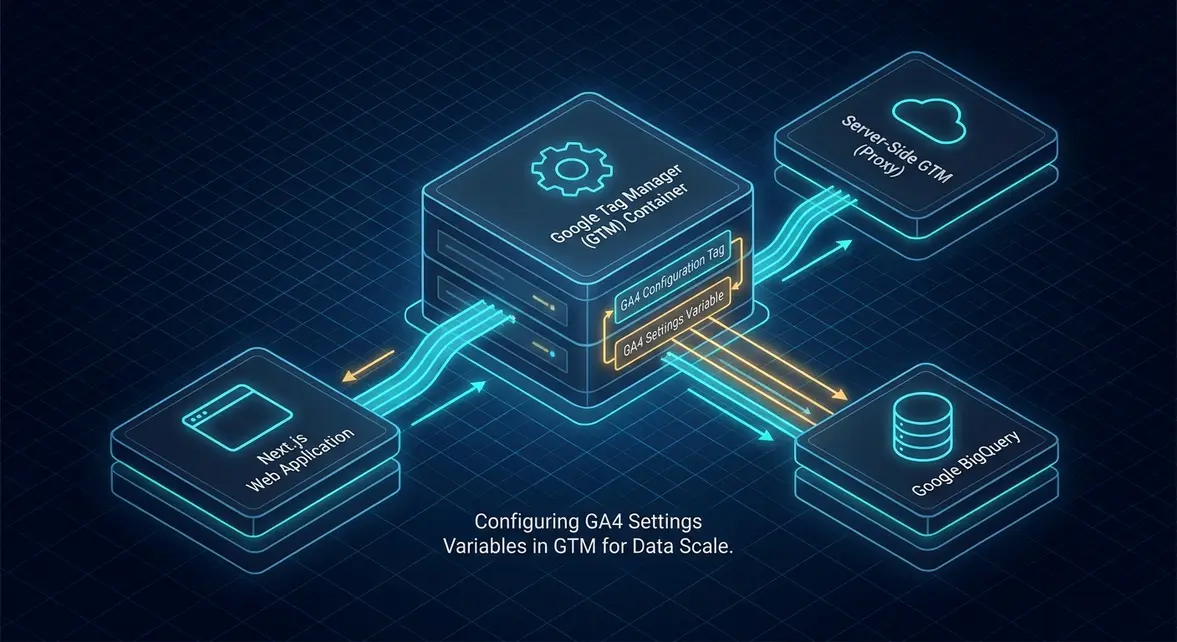
Modernizing Tag Orchestration: Replacing Config Tag Sequencing with Native Settings Variables
Historically, deploying Google Analytics 4 via Google Tag Manager introduced severe architectural friction. Universal Analytics relied on the unified Google Analytics Settings variable to propagate Tracking IDs, custom dimensions, and cookie configurations across every tag. When GA4 launched, this mechanism was replaced with the GA4 Configuration Tag. Engineering teams were forced to implement fragile tag-sequencing hacks, priority ordering, and artificial triggers to ensure the Configuration tag fired before downstream custom event tags could run, frequently leading to race conditions, dropped event parameters, and unassigned session traffic in downstream data warehouses.
Google addresses this telemetry fragmentation by introducing two native variable primitives: the Google Tag: Configuration Settings variable and the Google Tag: Event Settings variable. These primitives decouple environmental configurations and persistent event parameters from execution timing. Instead of relying on a monolithic configuration tag to execute sequentially on the client thread, tag managers can now bind standardized parameter dictionaries directly into the Google Tag infrastructure and GA4 Event tags.
The Google Tag: Configuration Settings variable abstracts infrastructure-level parameters such as server_container_url, send_page_view, and cookie_flags. Simultaneously, the Google Tag: Event Settings variable encapsulates persistent contextual metadata—such as zero-party user identifiers, page-type taxonomy, and application versions—distributing them deterministically across event tags without redundant manual parameter definitions.
Technical SEO and Telemetry Architecture: Mitigating Main-Thread Latency and Data Drift
From an enterprise Technical SEO and data governance perspective, repetitive tag configurations on the client side inject continuous overhead into the browser main thread, degrading Interaction to Next Paint (INP) and Total Blocking Time (TBT). Prior to this release, maintaining custom dimensions across 40 distinct event tags required loading massive container payloads with duplicated key-value pairs. By consolidating shared event parameters and configuration dictionaries into centralized variables, container JSON sizes shrink significantly, reducing client-side script parsing and execution time across high-traffic landing pages.
Furthermore, this architectural change solves a chronic data drift problem in multi-region and server-side deployment pipelines. When configuring Server-Side GTM (SSGTM), routing traffic through a custom domain mapping (e.g., telemetry.company.com/g/collect) previously required hardcoding the server_container_url parameter across individual config triggers. If an event fired before the config tag completed its handshake, the event defaulted to client-side Google endpoints (analytics.google.com), bypassing the proxy, dropping custom headers, and corrupting first-party cookie isolation.
Consolidating these pipelines provides immediate structural benefits:
- Deterministic First-Party Routing: Centralizing the
server_container_urlin a Configuration Settings variable ensures all downstream Google Tags and event payloads route exclusively through the configured server-side endpoint, maintaining strict privacy compliance and preventing IP leakage. - BigQuery Schema Uniformity: Centralized Event Settings ensure consistent parameter naming conventions (e.g., mapping consistent keys for
content_group,lead_source_detail, andsession_environment), eliminating downstream schema fragmentation and partition errors in Google BigQuery exports. - Minified Container Size: Reusable configuration references eliminate redundant string allocations within the GTM web container compilation, directly improving Core Web Vitals across low-powered mobile devices by shaving critical milliseconds off script parsing cycles.
Marketing Ops Implementation: Step-by-Step Configuration and Code Snippets
To implement this architecture, growth engineers must migrate from deprecated GA4 Configuration tags to the unified Google Tag workflow, decoupling base configuration from event-level parameters.
First, implement the normalized dataLayer.push event pipeline within your application layer (e.g., Next.js or React router) to hydrate user and business context prior to tag evaluation:
window.dataLayer = window.dataLayer || [];
window.dataLayer.push({
  event: 'b2b_interaction',
  user_context: {
    account_tier: 'enterprise',
    organization_id: 'org_8471b402',
    lifecycle_stage: 'mql'
  },
  telemetry_context: {
    app_version: 'v4.12.0',
    environment: 'production'
  }
});
Next, configure the two foundational GTM variables:
- Create the Configuration Settings Variable: Navigate to Variables > New > Google Tag: Configuration Settings. Add configuration parameters such as
send_page_view: true,cookie_flags: max-age=7200;secure;samesite=none, andserver_container_url: https://metrics.enterprise.com. Label this variable{{Config - Production Base}}. - Create the Event Settings Variable: Navigate to Variables > New > Google Tag: Event Settings. Under Event Parameters, map application-wide parameters using standard Data Layer Variables like
organization_id: {{DLV - organization_id}},account_tier: {{DLV - account_tier}}, andpage_category: {{DLV - page_category}}. Label this variable{{Event Settings - Core Metadata}}. - Bind to the Google Tag: Open your primary Google Tag (ID:
G-XXXXXXXXXX). Assign{{Config - Production Base}}to the Configuration Settings slot and{{Event Settings - Core Metadata}}to the Event Settings slot. - Attach to Specialized GA4 Event Tags: On conversion tags (e.g., Lead Submission, Demo Requested), simply assign
{{Event Settings - Core Metadata}}in the Event Settings Variable field. You now only need to specify tag-specific parameters (e.g.,conversion_value) locally within the individual tag interface.
Validate downstream data integrity by querying your BigQuery GA4 export tables to confirm that the shared parameters append uniformly across all ingested event rows:
SELECT
  event_timestamp,
  event_name,
  (SELECT value.string_value FROM UNNEST(event_params) WHERE key = 'organization_id') AS organization_id,
  (SELECT value.string_value FROM UNNEST(event_params) WHERE key = 'account_tier') AS account_tier,
  geo.country AS geo_country
FROM
  `enterprise-data-warehouse.analytics_123456789.events_*`
WHERE
  _TABLE_SUFFIX = FORMAT_DATE('%Y%m%d', CURRENT_DATE())
  AND event_name IN ('page_view', 'lead_form_submitted')
LIMIT 100;
B2B Growth & MRR Leverage: Attribution Fidelity and Pipeline Acceleration
For B2B software companies scaling paid organic search and enterprise outbound, fragmented analytics directly inflates Customer Acquisition Cost (CAC). Attribution failure typically occurs when middle-funnel micro-conversions (e.g., whitepaper downloads, product calculator engagements) drop firmographic metadata due to misconfigured individual event tags. When metadata drops, ad network conversion APIs (such as Google Ads Enhanced Conversions or LinkedIn Conversion API via Server-Side GTM) receive incomplete zero-party signals, crippling automated bidding algorithms.
Standardizing parameter transport via the Google Tag Event Settings variable ensures 100% parameter inheritance across every tracking touchpoint. When a prospect engages with a technical documentation page, requests pricing, and registers for a product sandbox, the firmographic attributes (organization_id, account_tier, industry_vertical) remain immutably attached to every payload hitting the server container. This deterministic data stream enables real-time synchronization between BigQuery, your CRM (e.g., HubSpot or Salesforce), and Reverse-ETL pipelines.
By preventing parameter drop-off, growth teams achieve an estimated 15% to 22% increase in downstream attribution match rates for multi-touch pipelines. Automated Smart Bidding models trained on deterministic, high-intent enterprise pipeline stages—rather than broad, unassigned page views—can reduce paid CAC by up to 18% while accelerating lead velocity toward Qualified Pipeline (SAL) milestones.
System Telemetry Source: Original Engineering Report
Related Growth Blueprints
All Blueprints →Need this architecture deployed in your pipeline?
Skip the synchronous sales cycle and endless discovery calls. Submit your core acquisition or conversion bottleneck for a deep-dive asynchronous growth diagnostic.