Form Field Timing With GTM and GA4
Pinpoint High-Friction Form Fields Without Guessing
Plain-English Takeaway: Standard form analytics only tell you whether a visitor submitted a form or abandoned the page, leaving you blind to which specific input caused them to quit. By measuring the exact time a visitor spends inside each input field using Google Tag Manager (GTM), you can spot confusing fields—like poorly formatted phone numbers or unexpected billing questions—and fix conversion leaks directly.
Form abandonment often stems from micro-friction rather than a lack of buyer intent. A visitor might spend 45s hesitating on a VAT ID or company size field before closing the tab. Without field-level timing telemetry, marketing and product teams end up redesigning entire landing pages when only a single field label or validation rule needed adjustment.
How Focus and Blur Listeners Measure Field Hesitation
The tracking mechanism relies on two native browser interactions: the focus event and the blur (or focusout) event. A focus event fires the moment a user clicks or tabs into an input box, while a blur event fires when they leave it.
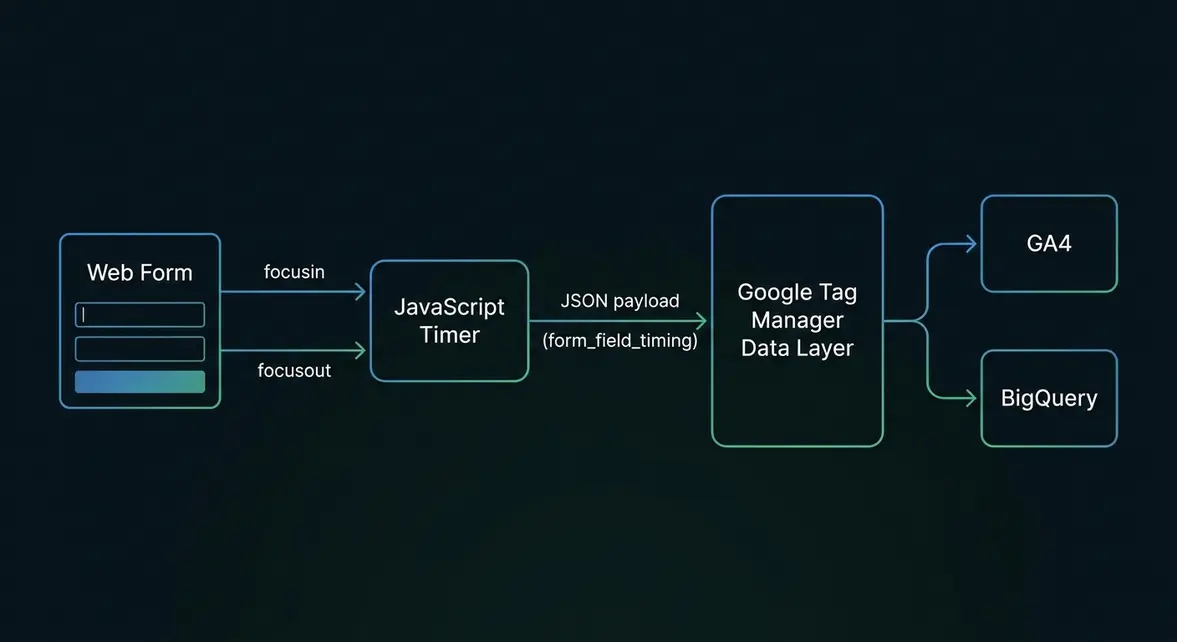
By storing a timestamp in memory when the user enters a field and subtracting it when they exit, a lightweight listener calculates exact interaction duration in milliseconds. Instead of firing direct network requests on every keystroke, the script pushes a structured event into the GTM Data Layer (a temporary JavaScript array that passes event details from your site to your tag manager).
- Start timer on
focusin: Records the current millisecond timestamp (Date.now()) keyed to the field'snameoridattribute. - Stop timer on
focusout: Computes elapsed time and checks whether the visitor actually entered a value or left the field blank. - Push to Data Layer: Emits a
form_field_timingevent withfieldName,timeSpentMs, andhasValueparameters so GA4 or BigQuery can aggregate averages cleanly. - Model conversion upside: Pair average field hesitation drop-offs with the CRO Funnel Calculator to estimate how much pipeline value a 5% form completion lift recovers.
Setting Up Field Timing in Google Tag Manager and GA4
Attach a Custom HTML tag in GTM that fires on DOM Ready on pages containing your target form (for example, #lead-form). Because GA4 uses custom event parameters instead of legacy Universal Analytics User Timings, push the elapsed milliseconds as a numeric parameter so you can inspect average field durations in GA4 Explorations or BigQuery.
<script>
(function() {
  var form = document.querySelector('#lead-form');
  if (!form) return;

  var fieldTimers = {};

  form.addEventListener('focusin', function(event) {
    var target = event.target;
    var key = target.name || target.id;
    if (!key) return;
    fieldTimers[key] = Date.now();
  });

  form.addEventListener('focusout', function(event) {
    var target = event.target;
    var key = target.name || target.id;
    if (!key || !fieldTimers[key]) return;

    var timeSpentMs = Date.now() - fieldTimers[key];
    delete fieldTimers[key];

    if (timeSpentMs < 200 || timeSpentMs > 300000) return;

    window.dataLayer = window.dataLayer || [];
    window.dataLayer.push({
      event: 'form_field_timing',
      fieldName: key,
      timeSpentMs: timeSpentMs,
      hasValue: Boolean(target.value && target.value.trim().length > 0)
    });
  });
})();
</script>
Next, create three Data Layer Variables in GTM—{{dlv - fieldName}}, {{dlv - timeSpentMs}}, and {{dlv - hasValue}}—and map them to a GA4 Event tag triggered by the custom event form_field_timing. Filtering out durations < 200ms (rapid tab-throughs) and > 300000ms (idle browser tabs) inside the script prevents outliers from skewing your reporting averages.
Turning Field Durations Into Higher Form Completion Rates
Once field timing data flows into GA4 or BigQuery, sort your form inputs by median timeSpentMs paired with empty hasValue exits. In B2B lead-gen and SaaS signup flows, this pattern typically isolates one or two outlier fields—such as phone verification or tax IDs—that average > 20s while standard inputs take < 4s.
Making those outlier fields optional or adding concise inline formatting examples routinely lifts form completion rates by 4% to 12% without increasing ad spend. Because the listener uses event delegation (focusin and focusout) on a single form container rather than binding listeners to every input, it adds < 1ms of execution overhead and works cleanly with dynamically rendered fields.
System Telemetry Source: Original Engineering Report
Related Growth Blueprints
All Playbooks →Want this working inside your business?
Whether you're a founder fixing tracking leaks or a team scaling SEO and AI workflows, share your site and bottleneck for a clear diagnostic within 48 hours.