GA4 Consent Mode: Reprocessing Denied Hits on Opt-In
Fix Missing Attribution Without Double-Counting Page Views
Plain-English Takeaway: When a visitor lands on your site with tracking consent denied, Google Analytics 4 (GA4) sends stripped-down cookieless pings instead of full session data. If that visitor clicks Accept on your cookie banner seconds later, GA4 automatically reprocesses those earlier denied hits—meaning manual workarounds to re-fire page_view tags actually corrupt your metrics with duplicate traffic.
For growth teams and marketers, this behavior directly impacts how landing pages and paid ad campaigns get credited. Previously, many setups forced a second page_view hit upon banner acceptance to recover lost UTM campaign parameters (the tags telling GA4 which ad brought the user). Because Advanced Consent Mode (Google's framework that sends anonymized pings before opt-in) already stitches the initial hit once consent is granted, removing redundant triggers protects conversion rates and bounce metrics from artificial inflation.
How Advanced Consent Mode Transitions Work
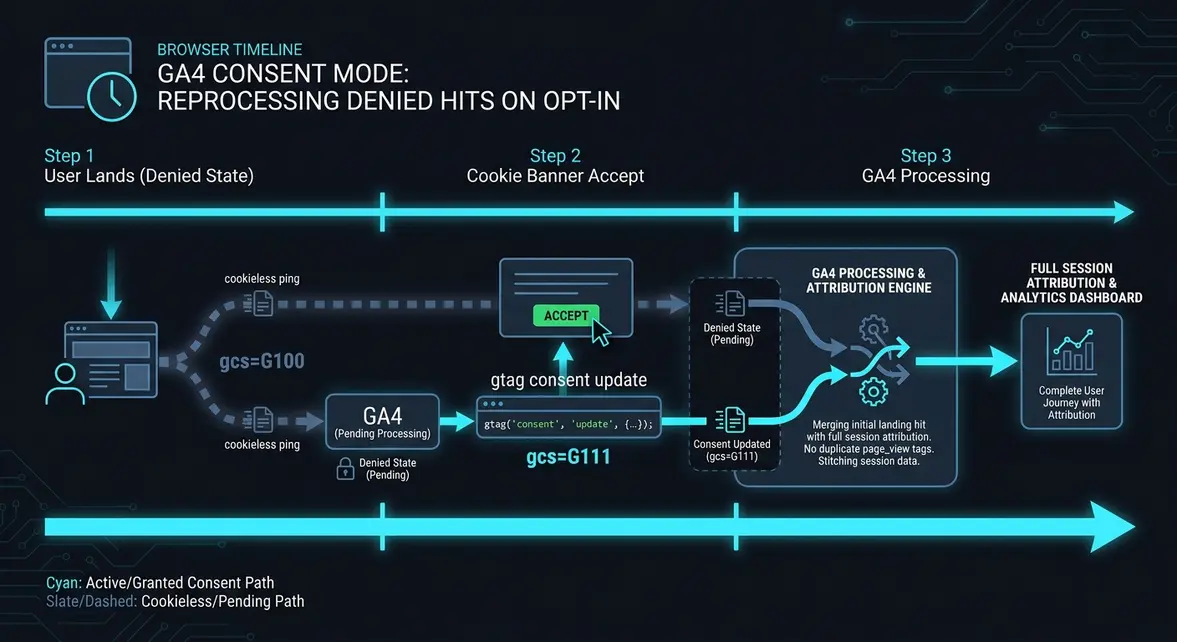
To understand why extra tags break reporting, trace what happens in the browser during the first three seconds of a visit. When a user arrives from an ad, Google Tag Manager (GTM) reads the default consent state before firing any analytics tags.
- Initial Denied State (
analytics_storage: denied): GA4 still sends a hit, known as a cookieless ping. It strips out persistent cookies like the Client ID (the unique browser identifier) and Session ID, passing a consent signal parameter (gcs=G100) instead. - Consent Update (
analytics_storage: granted): The user clicks Accept on your Consent Management Platform (CMP). Your CMP triggers a consent update command, and GA4 immediately writes the_gacookie and sends an updated consent signal (gcs=G111). - Server-Side Reprocessing: Instead of treating the initial landing ping as an anonymous dead end for behavioral modeling only, GA4 associates the prior denied hits from that page session with the newly granted identifiers, preserving the original landing URL and paid UTM parameters.
If your GTM container is configured to fire a second page_view tag on the CMP's consent-granted trigger, GA4 records two page views for a single visit. That skews pages-per-session, lowers engagement rate calculations, and complicates funnel drop-off diagnostics.
Auditing GTM Triggers and Verifying Hits in BigQuery
First, verify that your consent initialization runs before your Google Tag fires, and ensure your Google Tag only fires once per page load (typically on Initialization - All Pages) rather than firing again on a custom consent update event. If you manage consent manually via gtag.js, keep your initialization and update calls clean without duplicating config calls:
// 1. Run before GTM or gtag config loads: set default denied state
window.dataLayer = window.dataLayer || [];
function gtag() { dataLayer.push(arguments); }

gtag('consent', 'default', {
  'ad_storage': 'denied',
  'ad_user_data': 'denied',
  'ad_personalization': 'denied',
  'analytics_storage': 'denied',
  'wait_for_update': 500
});

// 2. Triggered ONLY when user clicks Accept in your banner
// Do NOT call gtag('config', 'G-XXXXXXXXXX') again here
function onUserAcceptConsent() {
  gtag('consent', 'update', {
    'ad_storage': 'granted',
    'ad_user_data': 'granted',
    'ad_personalization': 'granted',
    'analytics_storage': 'granted'
  });
}
Next, inspect your existing GA4 BigQuery export to confirm whether legacy GTM rules are double-firing page_view events within seconds of a session starting. Run this SQL query against your recent events_* table to detect duplicate page views on the same URL within a 10s window:
WITH page_views AS (
  SELECT
    user_pseudo_id,
    (SELECT value.int_value FROM UNNEST(event_params) WHERE key = 'ga_session_id') AS session_id,
    (SELECT value.string_value FROM UNNEST(event_params) WHERE key = 'page_location') AS page_url,
    event_timestamp,
    LAG(event_timestamp) OVER (
      PARTITION BY user_pseudo_id, (SELECT value.int_value FROM UNNEST(event_params) WHERE key = 'ga_session_id')
      ORDER BY event_timestamp
    ) AS prev_timestamp
  FROM `your-project.analytics_123456789.events_*`
  WHERE _TABLE_SUFFIX BETWEEN FORMAT_DATE('%Y%m%d', DATE_SUB(CURRENT_DATE(), INTERVAL 7 DAY))
    AND FORMAT_DATE('%Y%m%d', DATE_SUB(CURRENT_DATE(), INTERVAL 1 DAY))
    AND event_name = 'page_view'
)
SELECT
  COUNT(*) AS suspected_duplicate_pageviews,
  COUNT(DISTINCT CONCAT(user_pseudo_id, CAST(session_id AS STRING))) AS affected_sessions
FROM page_views
WHERE (event_timestamp - prev_timestamp) < 10000000; -- 10 seconds in microseconds
If suspected_duplicate_pageviews spikes across sessions where users interact with your cookie banner, audit your GTM triggers for variables like {{Consent State}} or CMP update events attached to your GA4 Configuration / Google Tag.
Recovering Accurate Attribution Without Tag Bloat
Removing redundant page_view triggers on consent updates typically resolves 10% to 25% of inflated page view volume on EU and UK properties where opt-in banners appear on initial landing. Your paid search and social acquisition reports retain clean first-touch UTM attribution because GA4 reprocesses the initial hit rather than over-attributing subsequent pages to (direct) / (none).
Before shipping changes to production, test the pre-consent and post-consent network payloads in a staging browser. You can validate your tag firing sequence and inspect live consent parameters using the Tracking Inspector to confirm that gcs transitions cleanly from G100 to G111 without dispatching duplicate page_view requests.
System Telemetry Source: Original Engineering Report
Related Growth Blueprints
All Playbooks →Want this working inside your business?
Whether you're a founder fixing tracking leaks or a team scaling SEO and AI workflows, share your site and bottleneck for a clear diagnostic within 48 hours.