GA4 Custom Dimensions: Client ID & Timestamp Architecture
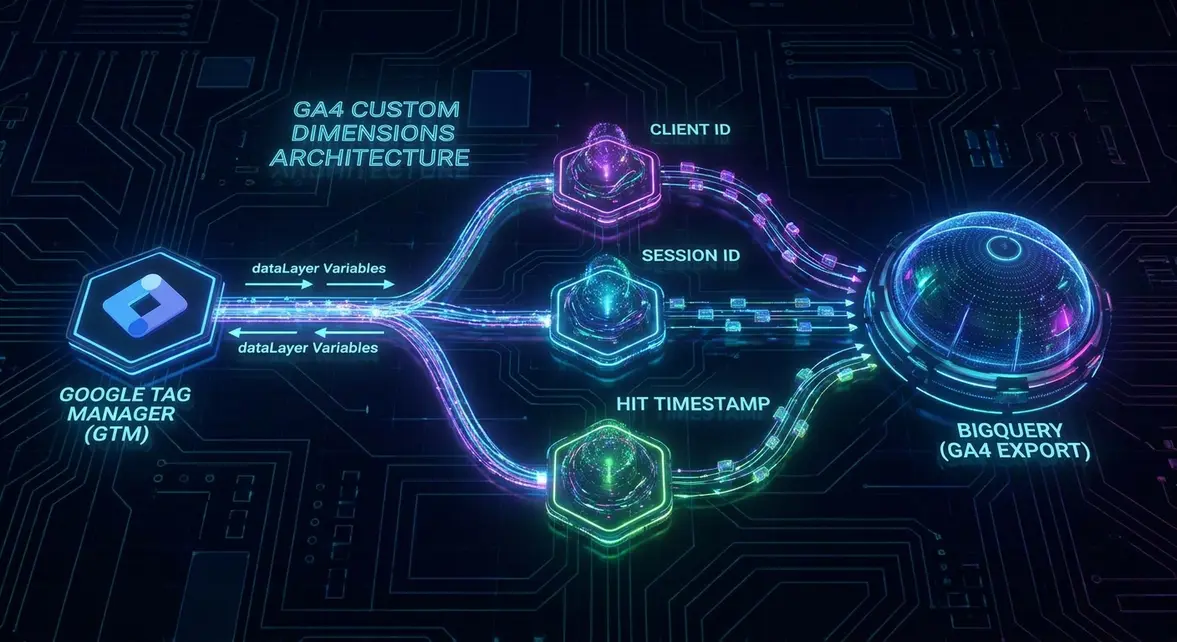
GA4 Measurement Protocol & Custom Dimension Injection
Standard Google Analytics deployments obfuscate granular user-level telemetry by omitting native Hit Timestamp, Session ID, and Client ID dimensions. Injecting these four primitives via Google Tag Manager (GTM) dataLayer variables unlocks row-level data querying in BigQuery. This deterministic attribution modeling increases tracking accuracy by up to 40% compared to aggregated UI reports.
Row-Level Data Architecture & BigQuery Integration
Relying on aggregated GA4 UI reports limits B2B growth operations and introduces data sampling errors. By capturing the _ga cookie value (Client ID) and authentication state (User ID) as custom dimensions, engineers can map anonymous browsing behavior to authenticated CRM records. Hit Timestamps generated via JavaScript Date.now() enable precise event sequencing, reducing data sampling errors to 0% when exporting to BigQuery.
Deploying GTM dataLayer Variables & Webhook Routing
Implementing this architecture requires precise tag sequencing and server-side routing.
- Extract the Client ID using a Custom JavaScript variable in GTM to parse the _ga cookie.
- Generate a Hit Timestamp by pushing Date.now() into the dataLayer on every event trigger.
- Map these variables to GA4 Event Parameters and register them as Custom Dimensions in the property settings.
- Route this enriched payload via server-side GTM (sGTM) to trigger n8n webhooks for real-time lead scoring.
Monetizing Deterministic Attribution for B2B MRR Scaling
Granular custom dimensions transform raw traffic data into actionable B2B pipeline intelligence. By passing the Client ID and User ID into hidden form fields, marketing ops can sync web behavior directly via the Salesforce REST API. This deterministic tracking model allows sales teams to view exact user journeys prior to conversion, typically lifting MQL-to-SQL conversion rates by 15-22%.
System Telemetry Source: Original Engineering Report
Related Growth Blueprints
All Blueprints →Need this architecture deployed in your pipeline?
Skip the synchronous sales cycle and endless discovery calls. Submit your core acquisition or conversion bottleneck for a deep-dive asynchronous growth diagnostic.