Track Previous Page URLs Cleanly With GTM Referrer
Recovering Previous-Page Attribution Without Custom Scripts
Plain-English Takeaway: When marketing and product teams cannot see which previous page sent a visitor to a signup form or checkout, assisted conversion data disappears and acquisition budgets get misallocated. Using Google Tag Manager's native {{Referrer}} variable—and splitting it into host name and path components—lets you capture exact previous-page context in GA4 and fire conditional tags without writing fragile regex.
Many teams still append manual UTM parameters to internal navigation links just to track whether a banner or pricing table drove a conversion. In GA4, internal UTMs overwrite the visitor's true acquisition source and artificially inflate session counts. By relying on the browser's native document.referrer value via GTM and checking live redirect/referrer headers with our Tracking Inspector and UTM Redirect Checker, you keep session attribution intact while still knowing the exact prior step.
How GTM Referrer Component Parsing Works
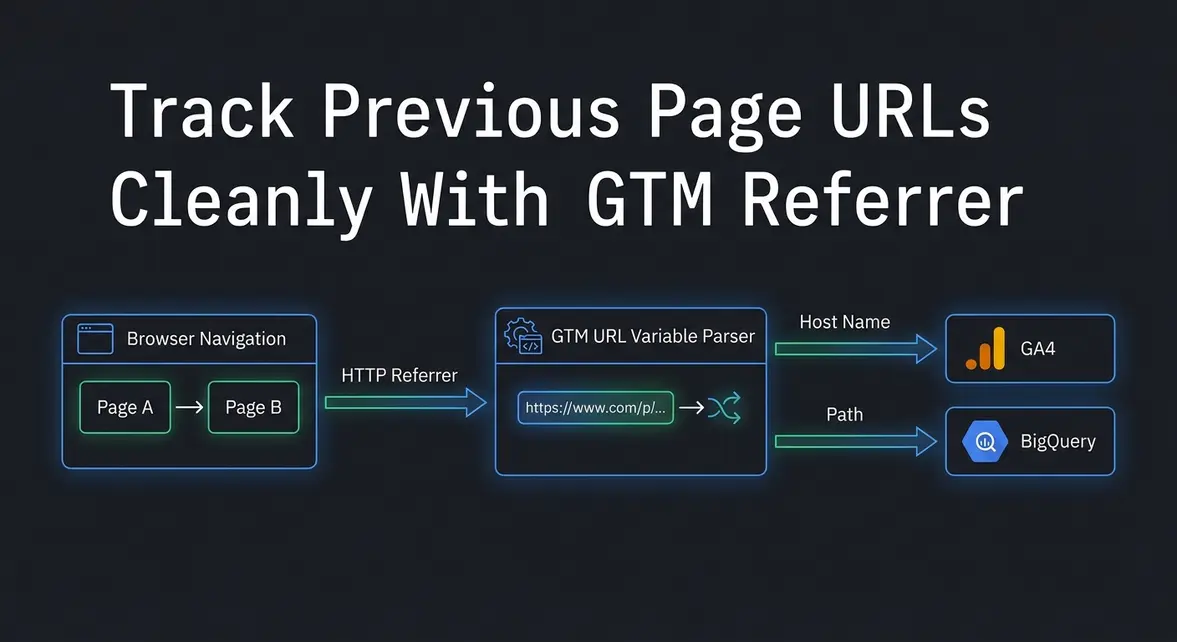
When a browser navigates from Page A to Page B, it passes Page A's address inside the HTTP Referer header, which JavaScript exposes as document.referrer. Google Tag Manager reads this value automatically once you enable its built-in {{Referrer}} variable (historically referred to as a macro).
Rather than parsing full URL strings with custom code every time you need a domain or route, GTM's User-Defined URL variable type accepts {{Referrer}} as its input source. This lets operators and engineers cleanly isolate specific segments of the previous page URL for triggers and event parameters:
- Full URL (
{{Referrer}}): Captures the complete previous address (such as a partner article or search engine URL) for debugging and raw BigQuery event exports. - Host Name (
{{Referrer Host Name}}): Extracts only the domain, making it simple to distinguish internal page transitions from external referral traffic or affiliate domains. - Path (
{{Referrer Path}}): Isolates the route (such as/pricingor/docs/api), allowing conversion tags to fire only when visitors arrive directly from a high-intent page.
Technical Implementation: GTM Setup and Normalization
To deploy this in production, first open your GTM workspace, navigate to Variables > Built-In Variables > Configure, and check Referrer. Next, create two User-Defined Variables of type URL, set URL Source to {{Referrer}}, and set Component Type to Host Name for {{Referrer Host Name}} and Path for {{Referrer Path}}.
Because Single Page Applications (SPAs) update routes client-side without reloading the document, document.referrer can stay frozen on the visitor's initial landing referrer. Always verify that {{Referrer Host Name}} matches your current hostname before trusting {{Referrer Path}} as an internal route—otherwise an external landing from https://google.com/search would falsely report /search as an internal previous page:
// GTM Custom JavaScript Variable (ES5-compatible)
function() {
  var referrerHost = {{Referrer Host Name}};
  var nativeReferrerPath = {{Referrer Path}};
  var currentHost = window.location.hostname;
  var currentPath = window.location.pathname;
  var storageKey = 'gc_last_internal_path';

  var storedPath = '';
  try {
    storedPath = window.sessionStorage.getItem(storageKey) || '';
    window.sessionStorage.setItem(storageKey, currentPath);
  } catch (e) {
    // Ignore storage errors in restricted browser modes
  }

  // Only treat nativeReferrerPath as an internal route when the referrer host matches this site
  if (referrerHost === currentHost && nativeReferrerPath && nativeReferrerPath !== currentPath) {
    return nativeReferrerPath;
  }

  if (storedPath && storedPath !== currentPath) {
    return storedPath;
  }

  return referrerHost ? '(external: ' + referrerHost + ')' : '(direct)';
}
Attach this variable (or {{Referrer Host Name}} directly for standard multi-page sites) as an event parameter such as previous_page_path on your GA4 configuration or key conversion events, then verify the output in GTM Preview mode.
Practical Impact: Cleaner Attribution and Trigger Precision
Replacing internal UTMs and regex triggers with structured {{Referrer}} component variables eliminates broken session stitching in GA4 and cuts ongoing tag maintenance. Marketing leads gain reliable funnel-step reporting in BigQuery, while engineers avoid maintaining brittle URL-parsing scripts across templates.
As a final safeguard, confirm your web server or CDN uses a Referrer-Policy header such as strict-origin-when-cross-origin. This ensures external domains still pass origin-level attribution while internal page transitions retain full {{Referrer Path}} visibility across your funnel.
System Telemetry Source: Original Engineering Report
Related Growth Blueprints
All Playbooks →Want this working inside your business?
Whether you're a founder fixing tracking leaks or a team scaling SEO and AI workflows, share your site and bottleneck for a clear diagnostic within 48 hours.