Prevent Repeat GTM Transactions With First-Party Cookies
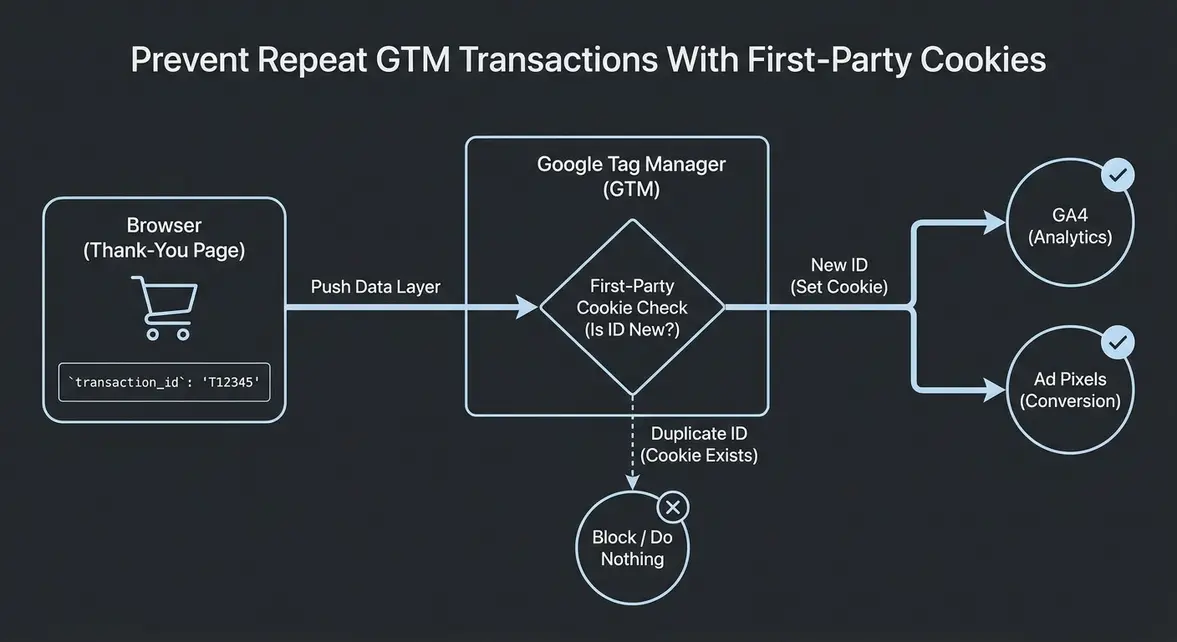
Stop Duplicate Purchase Events From Inflating Revenue
Plain-English Takeaway: When shoppers reload an order confirmation page, press the browser Back button, or click a receipt link from a confirmation email, your analytics and ad tags can fire the same purchase twice. This inflates reported revenue, distorts return on ad spend (ROAS), and feeds inaccurate conversion signals into automated ad bidding. Using a lightweight first-party cookie gate in Google Tag Manager (GTM) ensures each transaction ID triggers your conversion tags once per browser.
Most e-commerce storefronts push a purchase event into the dataLayer (a JavaScript array that passes structured page data to GTM) whenever the receipt URL loads. Although Google Analytics 4 (GA4) attempts server-side deduplication when a transaction_id is included, downstream ad pixels like Meta Pixel and Google Ads conversions often record duplicate conversions—skewing reported ROAS by 5% to 15% on mobile stores where customers leave confirmation tabs open.
How the First-Party Cookie Gate Works
To block repeat hits without waiting on backend engineering changes, GTM can store previously recorded order numbers inside a first-party cookie (a small text file written by your own domain in the user's browser). Before any purchase tag executes, GTM checks whether the incoming order ID already exists in that cookie.
Here is the step-by-step execution flow on every confirmation page load:
- Read the incoming order ID: GTM extracts the current order number using a Data Layer Variable (
{{DLV - Transaction ID}}). - Inspect stored order history: A Custom JavaScript variable reads a comma-separated list of past order IDs from a first-party cookie named
gtm_txn_ids. - Gate the conversion trigger: If the current order ID matches an entry in the cookie, the variable returns
true, blocking GA4 and ad pixel triggers from firing again. - Append new orders after firing: If the order ID is new, the conversion tags fire normally, and a follow-up script writes the ID to the cookie so subsequent reloads are ignored.
Technical Implementation in Google Tag Manager
First, create two foundational variables in GTM: a Data Layer Variable named {{DLV - Transaction ID}} mapped to ecommerce.transaction_id, and a 1st-Party Cookie variable named {{Cookie - gtm_txn_ids}} reading the cookie name gtm_txn_ids.
Next, create a Custom JavaScript variable named {{JS - Is Duplicate Transaction}}. This script checks whether the incoming transaction_id is already present in the browser cookie:
function() {
  var rawId = {{DLV - Transaction ID}};
  var existingIds = {{Cookie - gtm_txn_ids}};

  if (!rawId || !existingIds) {
    return false;
  }

  var cleanId = String(rawId).replace(/[^a-zA-Z0-9_-]/g, '');
  var idList = String(existingIds).split(',');

  return idList.indexOf(cleanId) !== -1;
}
Add a condition to your Purchase trigger (or Trigger Exception) so your GA4 and ad pixel tags only fire when {{JS - Is Duplicate Transaction}} equals false. Then, create a Custom HTML tag configured to fire via Tag Sequencing immediately after your primary purchase tag completes, persisting the sanitized ID for 30 days:
<script>
  (function() {
    var rawId = {{DLV - Transaction ID}};
    if (!rawId) return;

    var cleanId = String(rawId).replace(/[^a-zA-Z0-9_-]/g, '');
    if (!cleanId) return;

    var cookieName = 'gtm_txn_ids';
    var existingIds = {{Cookie - gtm_txn_ids}};
    var idArray = existingIds ? String(existingIds).split(',') : [];

    if (idArray.indexOf(cleanId) === -1) {
      idArray.push(cleanId);
      if (idArray.length > 20) {
        idArray.shift();
      }
      var expires = new Date();
      expires.setTime(expires.getTime() + (30 * 24 * 60 * 60 * 1000));
      document.cookie = cookieName + '=' + idArray.join(',') +
        '; expires=' + expires.toUTCString() + '; path=/; SameSite=Lax; Secure';
    }
  })();
</script>
Capping the stored array at 20 IDs keeps the cookie payload compact so it never approaches browser header size limits. Setting SameSite=Lax; Secure ensures compatibility with modern HTTPS checkout flows.
Practical Impact and Attribution Stability
Deploying this cookie gate eliminates artificial revenue inflation across ad platforms and keeps automated bidding models calibrated to actual net sales. Because the lookup executes locally in < 2ms, it introduces zero measurable checkout latency and removes dependency on backend database flags.
Before publishing your GTM workspace, test a full checkout in Preview mode and reload the receipt URL twice to confirm the duplicate check flips from false to true. You can also inspect live dataLayer payloads and confirm tag firing behavior using the Tracking Inspector to verify your deduplication logic holds in production.
System Telemetry Source: Original Engineering Report
Related Growth Blueprints
All Playbooks →Want this working inside your business?
Whether you're a founder fixing tracking leaks or a team scaling SEO and AI workflows, share your site and bottleneck for a clear diagnostic within 48 hours.