Deploying Server-Side GTM on Azure App Service
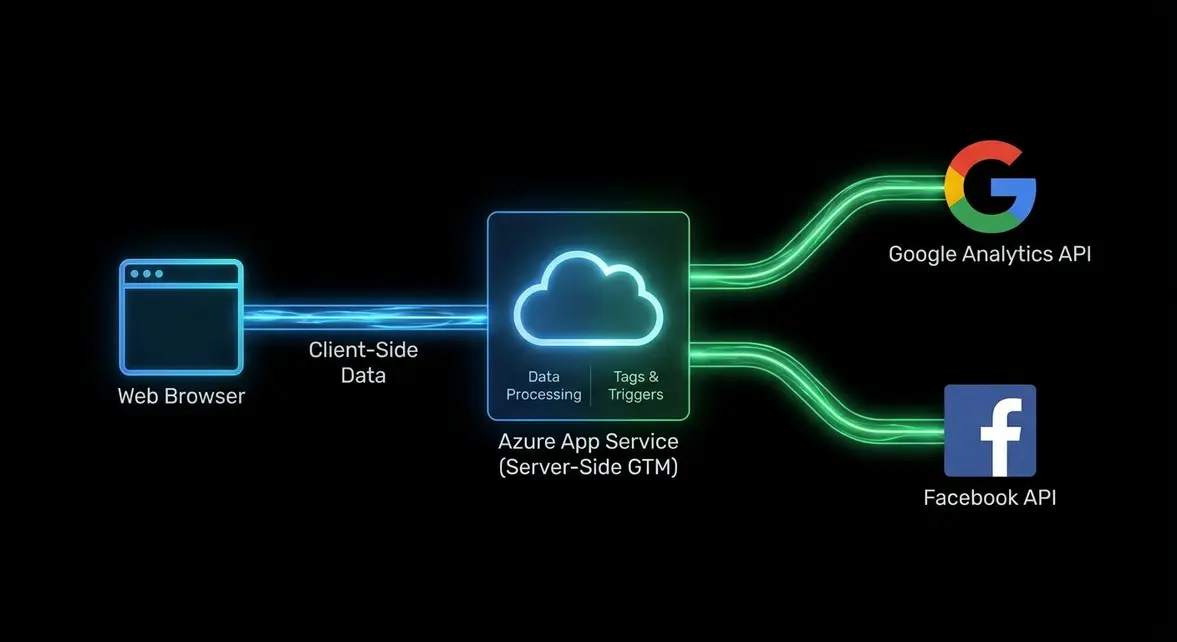
Architecting First-Party Data Pipelines via Azure App Service
The degradation of client-side tracking mechanisms via Intelligent Tracking Prevention (ITP), Safari 16.4+ updates, and aggressive network-level ad blockers has fundamentally compromised B2B data fidelity. Standard client-side Google Tag Manager (GTM) deployments exacerbate this by bloating the Document Object Model (DOM) and executing heavy third-party JavaScript on the browser's main thread. This directly degrades Core Web Vitals, specifically Interaction to Next Paint (INP) and Largest Contentful Paint (LCP), while simultaneously leaking conversion signals.
Deploying a Server Google Tag Manager (SGTM) container via Microsoft Azure App Service provides a robust infrastructure alternative to the default Google Cloud Platform (GCP) App Engine. By hosting the official SGTM Docker image within an Azure-managed Node.js environment, enterprise B2B stacks already entrenched in the Microsoft ecosystem can maintain strict compliance and governance. This architectural shift moves the execution burden away from the client browser, establishing a secure, first-party data collection endpoint that sanitizes and routes telemetry before it ever reaches third-party vendor APIs.
Core Web Vitals Optimization and Server-Side Rendering Logic
The operational shift from client-side dispatch to server-side processing fundamentally alters the rendering path and network waterfall. By stripping third-party vendor scripts—such as the Facebook Pixel, LinkedIn Insight Tag, and GA4 analytics.js/gtag.js libraries—from the client, engineering teams can reduce main thread blocking time by an average of 300-500ms. The browser is no longer tasked with resolving multiple DNS lookups, establishing separate TLS handshakes, and executing unoptimized vendor code.
This architecture relies on a single, consolidated first-party data stream. The client-side application sends a unified HTTP POST request to the Azure App Service endpoint (e.g., metrics.yourdomain.com). The server container then parses the incoming request, maps the event data to a standardized schema, and dispatches server-to-server (S2S) HTTP requests to downstream vendor APIs utilizing the GA4 Measurement Protocol and Facebook Conversions API (CAPI). This ensures that the client only ever communicates with a first-party subdomain.
From a Technical SEO standpoint, this directly impacts crawl budget and rendering efficiency. Googlebot no longer expends rendering resources executing bloated marketing scripts, ensuring that JavaScript-heavy Single Page Applications (SPAs) are indexed accurately. Furthermore, mapping the tracking endpoint to a first-party subdomain allows the server to set HttpOnly cookies, extending cookie lifespans against ITP algorithms and ensuring accurate multi-touch attribution for long-cycle B2B SEO campaigns.
- Main Thread Offloading: Shifts JavaScript execution to the Azure Node.js environment, reliably dropping LCP to < 2.5s and improving INP.
- First-Party Cookie Extension: Sets secure, server-side
HttpOnlycookies, bypassing the strict 7-day expiration limits imposed by WebKit's ITP. - Payload Consolidation: Replaces 5+ disparate client-side network requests with a single
/g/collectPOST request, drastically reducing client payload size.
Deploying the SGTM Docker Container on Azure
Execution requires provisioning a Web App within Azure App Service, pulling the official Google Docker image (gcr.io/cloud-tagmanager/gtm-cloud-image), and configuring the necessary environmental variables. Unlike a standard Node.js deployment, the SGTM image requires specific configuration strings generated from the GTM user interface to authenticate and link the server container to your workspace.
Below is the required Azure CLI command structure to deploy the containerized web app. You must inject the CONTAINER_CONFIG string provided by your GTM Server container settings. Additionally, mapping the PORT variable ensures the Azure App Service routes incoming HTTP traffic correctly to the Docker container's exposed port.
az webapp create --resource-group myResourceGroup \
  --plan myAppServicePlan \
  --name mySgtmApp \
  --deployment-container-image-name gcr.io/cloud-tagmanager/gtm-cloud-image:latest

az webapp config appsettings set --resource-group myResourceGroup \
  --name mySgtmApp \
  --settings CONTAINER_CONFIG="your_container_config_string_here" PORT=8080
Once the container is running and mapped to a custom first-party domain, you must configure the client-side GTM to route data to the new endpoint. Ensure that any dynamic GTM variables, such as {'{{Page URL}}'} or {'{{Event Name}}'}, are correctly mapped in your client-side GA4 Configuration tag to pass data into the server container's Event Data object. This requires updating the 'Transport URL' in the client-side tag to point to your new Azure App Service URL.
Accelerating B2B Pipeline Velocity and Reducing Blended CAC
Implementing server-side tagging on Azure directly impacts the bottom line by recovering lost conversion signals. In a typical B2B SaaS environment, ad blockers and aggressive browser privacy features obscure up to 20-30% of high-intent organic traffic and Marketing Qualified Lead (MQL) conversions. By routing data through a first-party Azure endpoint, growth teams restore visibility into these critical touchpoints, feeding highly accurate, deduplicated conversion data back into Google Ads and LinkedIn Ads algorithmic bidding models.
This data fidelity translates to a quantifiable reduction in blended Customer Acquisition Cost (CAC). With a theoretical 15% increase in captured MQL events via S2S integrations like the Conversions API, ad platform bidding models optimize faster and more aggressively, driving an estimated 12-18% decrease in cost-per-lead. Furthermore, the improved Core Web Vitals scores achieved by offloading client-side scripts provide a compounding organic lift, increasing SERP visibility and driving higher-margin organic Monthly Recurring Revenue (MRR) without proportional increases in paid acquisition spend.
System Telemetry Source: Original Engineering Report
Related Growth Blueprints
All Blueprints →Need this architecture deployed in your pipeline?
Skip the synchronous sales cycle and endless discovery calls. Submit your core acquisition or conversion bottleneck for a deep-dive asynchronous growth diagnostic.