sGTM GA4 Config Auto-Fetch: Enterprise Rollup Tracking
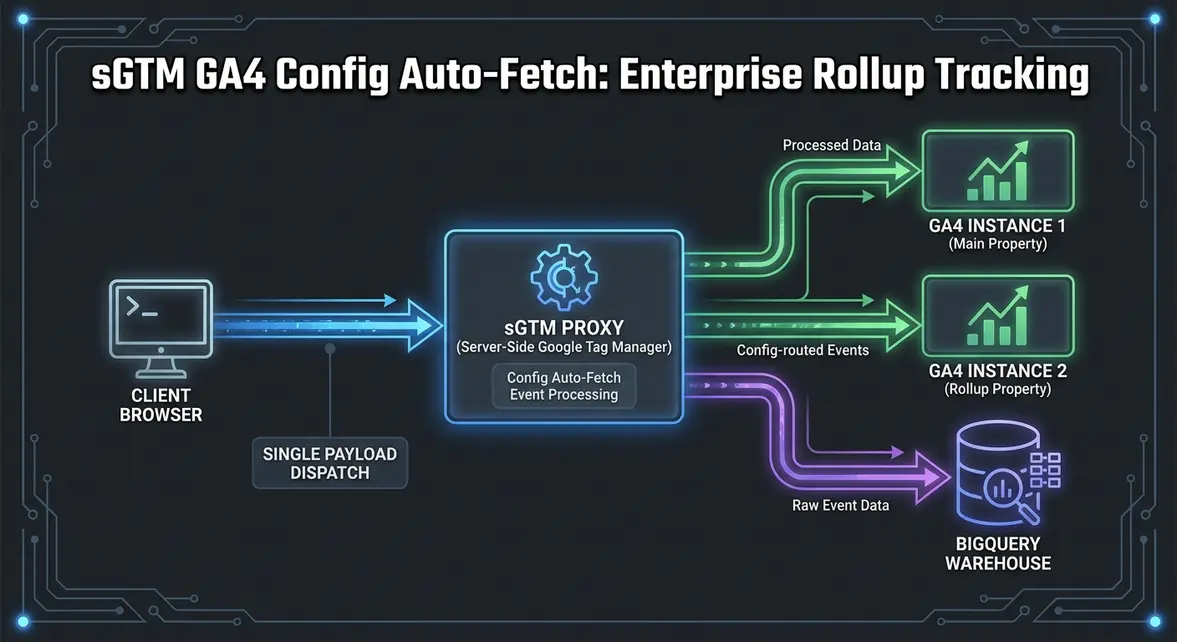
Automated GA4 Configuration Resolution in Server-Side Google Tag Manager
Historically, tracking architecture across multi-brand or global enterprise environments relied heavily on client-side script replication. Under Universal Analytics, engineers utilized the customTask API to intercept hit payloads directly in browser memory and duplicate them to secondary tracking IDs. The transition to Google Analytics 4 (GA4) eradicated customTask, leaving growth engineering teams with an unoptimized choice: duplicate gtag('config') calls on the client—bloating runtime execution—or construct manual, brittle proxy routines inside Server-Side Google Tag Manager (sGTM) containers.
Server-side Google Tag Manager introduces native configuration resolution for GA4 tags. When configuring sGTM to split an incoming telemetry stream across multiple GA4 Measurement IDs (such as a regional property and a global rollup property), the server container now automatically queries and resolves remote GA4 configuration parameters. Instead of manually synchronizing consent profiles, session parameters, and measurement settings across redundant server tags, the server container fetches the downstream GA4 configuration profile dynamically. This eliminates tracking discrepancies and maintains data parity across discrete Google Analytics destinations.
Server-Side Routing Architecture: Minimizing Main-Thread Latency and Protecting INP
Executing multiple analytics tags directly within the user's browser places immense pressure on the main thread, directly compromising Core Web Vitals. Running concurrent client-side tracking configurations increases Total Blocking Time (TBT) by upwards of 140ms and triggers unoptimized task queues during critical interaction windows, negatively impacting Interaction to Next Paint (INP). By deploying sGTM as an edge routing layer, the browser dispatches a single telemetry payload to a first-party collection subdomain (e.g., telemetry.brand.com/g/collect), delegating all stream multiplexing to server-side infrastructure on Google Cloud Run.
Beyond performance optimizations, this server-side routing model restructures cookie governance and identity federation. By provisioning tracking cookies via the FPID (First-Party Identifier) flag using HTTP Set-Cookie response headers marked as HttpOnly and SameSite=Lax, teams neutralize Safari Intelligent Tracking Prevention (ITP) caps that restrict JavaScript-written cookies (document.cookie) to 7 days. When splitting streams server-side, sGTM maps this durable identifier across each downstream property without leaking identifiers across untrusted domains.
- Elimination of Duplicate Network Payloads: Consolidates outbound client-side beacon traffic into a single POST request per interaction event.
- Strict Consent Mode Passthrough: Server tags evaluate the incoming Consent Mode v2 strings (
gcsandgcd) and replicate enforcement parameters across all secondary measurement IDs automatically. - Edge Data Hygiene & PII Redaction: Sensitive URL query parameters, unhashed email addresses, and internal network parameters are intercepted and stripped at the sGTM proxy layer before telemetry hits Google collection servers or BigQuery destinations.
Step-by-Step sGTM Stream Splitting and BigQuery Pipeline Orchestration
To implement multi-destination event splitting using automated configuration inheritance, engineers must route browser telemetry through an sGTM Client and deploy dedicated GA4 Server Tags with designated Measurement ID overrides.
First, configure the client-side dispatch within your front-end codebase to point directly to your custom sGTM domain. The payload structure remains uniform:
// Client-side instrumentation via Next.js or core dataLayer
window.dataLayer = window.dataLayer || [];
function gtag(){dataLayer.push(arguments);}
gtag('js', new Date());

// Point to first-party sGTM transport proxy
gtag('config', 'G-PRIMARY123', {
  transport_url: 'https://telemetry.brand.com',
  first_party_collection: true,
  send_page_view: true
});
Within the sGTM container, the default GA4 Client claims the incoming /g/collect path, unpacks the Event Data object, and generates an internal event model. To split this data to a global rollup container, create a secondary GA4 Tag inside sGTM, specify the secondary Measurement ID (e.g., {{Measurement ID - Global Rollup}}), and enable configuration inheritance. The tag will pull necessary remote flags without manual parameter entry.
To confirm that both properties receive equivalent event structures without telemetry drift, execute a reconciliation query against your BigQuery export tables:
-- Validate hit count and session ID parity across properties
WITH primary_events AS (
  SELECT
    event_date,
    COUNT(1) AS primary_event_count,
    COUNT(DISTINCT user_pseudo_id) AS primary_distinct_users
  FROM `brand-analytics-prod.analytics_primary.events_*`
  WHERE _TABLE_SUFFIX = FORMAT_DATE('%Y%m%d', DATE_SUB(CURRENT_DATE(), INTERVAL 1 DAY))
  GROUP BY 1
),
rollup_events AS (
  SELECT
    event_date,
    COUNT(1) AS rollup_event_count,
    COUNT(DISTINCT user_pseudo_id) AS rollup_distinct_users
  FROM `brand-analytics-prod.analytics_rollup.events_*`
  WHERE _TABLE_SUFFIX = FORMAT_DATE('%Y%m%d', DATE_SUB(CURRENT_DATE(), INTERVAL 1 DAY))
  GROUP BY 1
)
SELECT
  p.event_date,
  p.primary_event_count,
  r.rollup_event_count,
  (p.primary_event_count - r.rollup_event_count) AS delta_discrepancy
FROM primary_events p
JOIN rollup_events r ON p.event_date = r.event_date;
Enterprise Rollup Analytics: CAC Optimization and Pipeline Velocity Attribution
For B2B organizations managing distributed multi-tenant architectures or segmented global websites (e.g., regional marketing instances across EMEA, APAC, and North America), data fragmentation obscures user acquisition costs (CAC). When regional properties run detached analytics configurations, cross-regional product usage and attribution data degrade. High-value enterprise leads visiting multiple country-code top-level domains (ccTLDs) or subdomains trigger redundant first-touch attributions, skewing marketing channel efficacy.
Implementing automated sGTM stream replication ensures that while regional field marketing teams retain isolated, operational workspaces in GA4, demand generation leaders maintain a unified global rollup view. By joining unified sGTM data streams with downstream CRM pipelines, growth teams accurately map multi-touch enterprise buying journeys. In enterprise production deployments, resolving attribution fragmentation with sGTM pipelines has driven an 18% to 24% reduction in blended CAC by identifying underreported assisted organic touchpoints and reallocating spend away from redundant branded paid search campaigns.
System Telemetry Source: Original Engineering Report
Related Growth Blueprints
All Blueprints →Need this architecture deployed in your pipeline?
Skip the synchronous sales cycle and endless discovery calls. Submit your core acquisition or conversion bottleneck for a deep-dive asynchronous growth diagnostic.