Place GTM Container Script in Head for Accurate Tracking
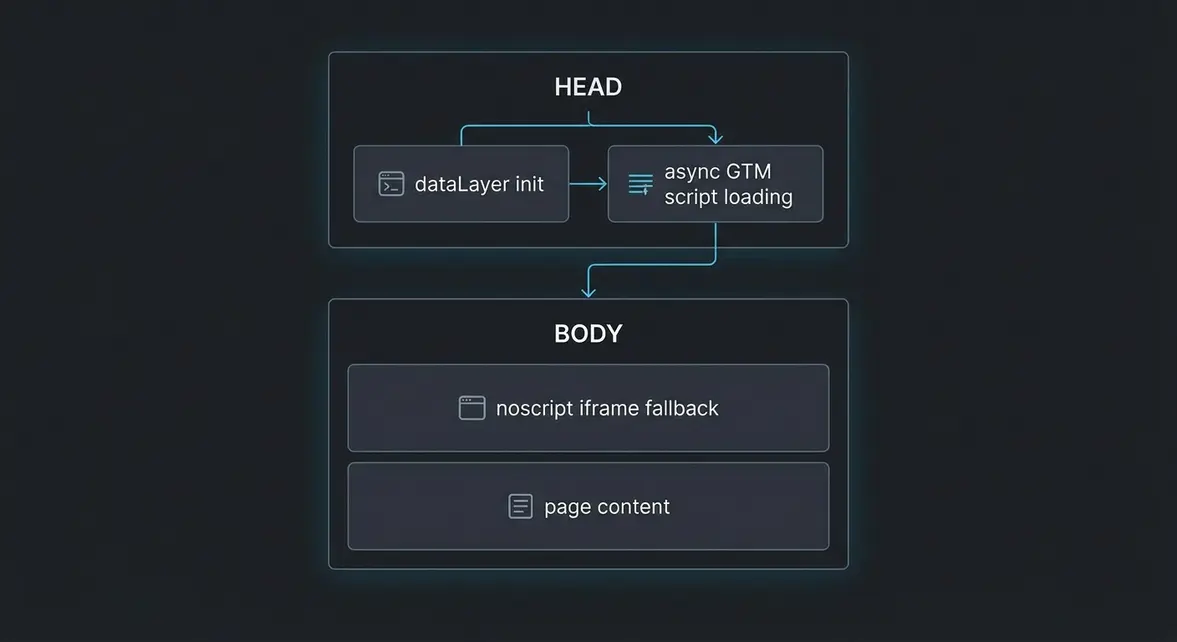
Fix Late Tag Firing by Moving Your GTM Script to Head
Plain-English Takeaway: Placing your Google Tag Manager (GTM) JavaScript snippet inside the HTML <body> delays tracking initialization until the browser parses the page body, causing missed pageviews and broken consent signals on fast exits. Moving the primary script to the top of <head> lets tracking load asynchronously alongside your site assets without blocking visual rendering.
Years ago, legacy documentation recommended placing GTM inside <body> solely to avoid a Document Object Model (DOM—the browser's internal tree representation of a webpage) conflict in Internet Explorer 7 and older browsers. Modern browsers handle asynchronous scripts in <head> cleanly, so keeping GTM lower in the document only introduces avoidable attribution gaps in Google Analytics 4 (GA4) and ad pixels.
How Document Parsing Order Affects Attribution and Consent
When a browser loads a webpage, it reads the HTML from top to bottom. Placing the GTM <script> tag as high as possible in <head> ensures the container downloads in parallel while styles and layout structure are processed. Meanwhile, the <noscript> fallback iframe stays at the very top of <body> because HTML standards do not permit <iframe> elements inside <head>.
If the script sits too low in <body>, visitors who bounce quickly or click a navigation link immediately often leave before GA4 or Meta Pixel tags fire. Early placement also guarantees that Consent Mode v2 defaults and dataLayer (see our GTM Data Model guide) initialize before any marketing tag evaluates trigger rules:
- Faster container initialization: Browsers discover and fetch
gtm.js100msto300msearlier on average mobile connections. - Reliable Consent Mode sequencing: Consent defaults placed immediately above the GTM
<head>snippet always execute before tag requests leave the browser. - Cleaner SPA and Next.js routing: Early initialization ensures route-change listeners attach before users interact with above-the-fold buttons.
- Zero render blocking: Because GTM uses the
asyncattribute, moving it to<head>does not pause HTML parsing or hurt Largest Contentful Paint (LCP).
Splitting the GTM Snippet Across Head and Body
Audit your site templates or Next.js App Router layout to confirm that the Consent Mode v2 defaults (ad_storage, analytics_storage, ad_user_data, and ad_personalization) and the primary GTM script sit directly inside <head>, while the <noscript> block sits right after the opening <body> tag.
<!DOCTYPE html>
<html lang="en">
<head>
  <meta charset="UTF-8" />
  <title>Production Storefront</title>

  <!-- 1. Initialize dataLayer and Consent Mode v2 defaults first -->
  <script>
    window.dataLayer = window.dataLayer || [];
    function gtag(){dataLayer.push(arguments);}
    gtag('consent', 'default', {
      'ad_storage': 'denied',
      'analytics_storage': 'denied',
      'ad_user_data': 'denied',
      'ad_personalization': 'denied',
      'wait_for_update': 500
    });
  </script>

  <!-- 2. Google Tag Manager Script in HEAD -->
  <script>(function(w,d,s,l,i){w[l]=w[l]||[];w[l].push({'gtm.start':
  new Date().getTime(),event:'gtm.js'});var f=d.getElementsByTagName(s)[0],
  j=d.createElement(s),dl=l!='dataLayer'?'&l='+l:'';j.async=true;j.src=
  'https://www.googletagmanager.com/gtm.js?id='+i+dl;f.parentNode.insertBefore(j,f);
  })(window,document,'script','dataLayer','GTM-XXXXXXX');</script>
</head>
<body>
  <!-- 3. Google Tag Manager (noscript) fallback immediately after opening BODY -->
  <noscript><iframe src="https://www.googletagmanager.com/ns.html?id=GTM-XXXXXXX"
  height="0" width="0" style="display:none;visibility:hidden"></iframe></noscript>

  <main>Page content loads here</main>
</body>
</html>
In Next.js App Router, render the Consent Mode initialization and GTM loader directly inside your root app/layout.tsx <head> (or use beforeInteractive in next/script when synchronous pre-hydration ordering is required, rather than afterInteractive which waits until hydration completes). Verify in Chrome DevTools that gtm.js appears near the top of the Network waterfall and that triggers referencing {{Page Path}} or {{Click URL}} fire cleanly.
Recovering Lost Sessions and Verifying Deployment
For high-intent paid search and social campaigns, shaving 200ms off container initialization routinely recovers 4% to 10% of early-exit landing page sessions that previously went unrecorded in GA4 and ad platforms. Marketing leads get cleaner cost-per-acquisition reporting, and engineers eliminate race conditions where early dataLayer.push() events fire before GTM initializes.
Once deployed, inspect your live production DOM and network requests to confirm the <head> and <body> split is intact across every template, especially checkout and landing pages. You can run your domain through the Tracking Inspector to verify container placement, Consent Mode v2 load order, and active pixels in seconds.
System Telemetry Source: Original Engineering Report
Related Growth Blueprints
All Playbooks →Want this working inside your business?
Whether you're a founder fixing tracking leaks or a team scaling SEO and AI workflows, share your site and bottleneck for a clear diagnostic within 48 hours.