GTM Data Model: Fix Lost Attribution Events
Stop Dropping Conversion Parameters in Google Tag Manager
Plain-English Takeaway: When your checkout or lead form pushes data into Google Tag Manager (GTM) out of order, conversion tags fire with missing revenue or user IDs. Understanding GTM's internal data model ensures every tag reads the exact state of your page, protecting GA4 attribution and ad platform bidding.
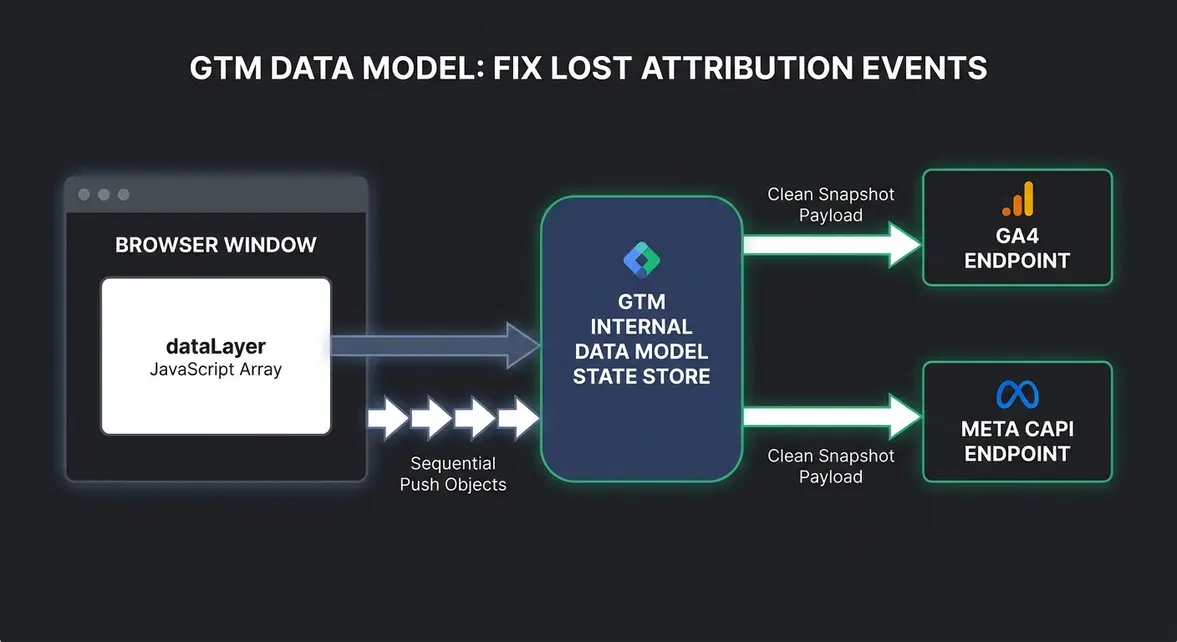
Many teams treat the dataLayer (the JavaScript array that passes website actions to GTM) as a simple list where each push stands alone. In reality, GTM copies every pushed value into a hidden internal object that persists across the page view. If an earlier step leaves stale values behind—or a required parameter arrives milliseconds after an event key—your tags send incomplete payloads to GA4 and Meta Conversions API (CAPI).
How GTM Merges the Data Layer into Its Internal Model
Think of the browser's window.dataLayer array as an inbox tray, and GTM's internal data model as a master whiteboard. Every time your website executes dataLayer.push(), GTM reads the new message and updates the master whiteboard by adding new keys or overwriting existing ones with the same name.
Crucially, GTM only checks triggers and fires tags when a push contains the reserved event key, or during built-in page lifecycle moments. When a tag fires, it takes a snapshot of the whiteboard at that exact timestamp—not just the single object that triggered it.
- Persistent state per page view: Keys such as
currencyoruser_tierremain in GTM's internal memory until overwritten or until the browser performs a full document reload. - Recursive merging in Version 2 variables: Pushing a nested
ecommerceobject merges properties into GTM's existing model, which can accidentally carry olditemsarrays into a newpurchaseevent on Single Page Applications (SPAs). - Snapshot isolation at event time: A Data Layer Variable like
{{DLV - transaction_id}}reads the value from GTM's internal model at the moment the triggeringeventexecutes, ignoring any pushes that happen afterward.
Technical Implementation: Safe Data Layer Reset Pattern
To prevent stale ecommerce or lead parameters from leaking between events—especially in Next.js or React SPAs—always clear nested objects before pushing a new payload, and include all required properties in the same dataLayer.push() call as the event key. You can standardize schemas with the Tracking Plan Builder and audit live page payloads using our Tracking Inspector before deploying tag changes.
Add the following reset-and-push pattern to your frontend checkout or conversion handler:
window.dataLayer = window.dataLayer || [];

// 1. Clear the previous ecommerce object in GTM's internal model
window.dataLayer.push({ ecommerce: null });

// 2. Push the complete event payload in a single atomic object
window.dataLayer.push({
  event: "purchase",
  ecommerce: {
    transaction_id: "ORD-94821",
    value: 149.0,
    currency: "EUR",
    items: [
      {
        item_id: "SKU-104",
        item_name: "Annual Pro Plan",
        price: 149.0,
        quantity: 1
      }
    ]
  }
});
In the GTM workspace, verify that your Data Layer Variables (for example, {{DLV - ecommerce.value}}) use Data Layer Version 2. Version 2 respects dot-notation nesting inside GTM's internal model, whereas Version 1 only reads top-level keys and treats dots as literal characters. Also ensure your GTM container snippet sits in <head> above initial pushes, then test the sequence in GTM Preview mode by opening the Data Layer tab on the purchase event.
Practical Impact on Attribution and Engineering Time
Standardizing how your frontend writes to GTM's data model eliminates silent conversion drops where GA4 records a purchase event with missing revenue or empty product arrays. Marketing leads regain consistent ROAS reporting across Google Ads and Meta CAPI without writing custom SQL patches in BigQuery to repair broken events.
For engineering teams, enforcing atomic pushes alongside explicit ecommerce: null resets cuts recurring analytics debugging tickets by roughly 50% on SPA storefronts. Developers maintain one predictable tracking contract per user action rather than chasing race conditions inside GTM triggers.
System Telemetry Source: Original Engineering Report
Related Growth Blueprints
All Playbooks →Want this working inside your business?
Whether you're a founder fixing tracking leaks or a team scaling SEO and AI workflows, share your site and bottleneck for a clear diagnostic within 48 hours.